 ).
). The cursor appears as a cross-hairs.
The Open window appears with which you browse for and select the image file to display in the region window, and then click Open.
Display an image from disk on the map by clicking the Image button in the Add group of the Annotations tab, and then drawing a region on the map in which the image will be displayed, and selecting the image on disk to which the region display box refers.
The display region is anchored to the underlying point on the map, but it can be dragged, resized, and copy-pasted like other annotation objects. The display region is saved to the Annotation layer or to a User Layer depending on which of the layers is currently active.
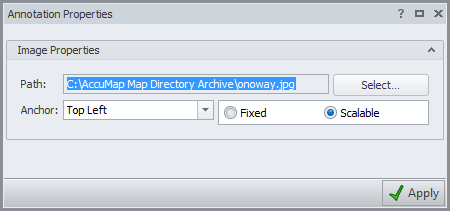
Right-click the image and select Properties from the context menu to display the Annotation Properties dialog box, where you specify the anchor point, whether the image is fixed or scalable when the map is zoomed, and from which you select a different image to display. Standard image formats (png, jpeg, gif, emf, bmp, tif/tiff, etc.) are supported.
If the location of an image file that is referenced by the region window is changed, the image is no longer displayed in AccuMap.
). The referenced image file appears on the map within the bounding box you created.
 Related Topics