Coloring Wellbores by Formation Penetrated
Color segments of the wellbore that penetrate certain formations.
To color wellbores by formation penetrated
- Do either of the following:
-
Using the Data toolbar - using the Wells group of the Data tab, click Formation Color Map ( ).
).
-
Using the Layer Legend - using the Layer Legend, select the Wells group, and then using the check box that appears below the Layer Draw Options label, select Use Well Symbols, and click Color Map.
The dialog box appears.
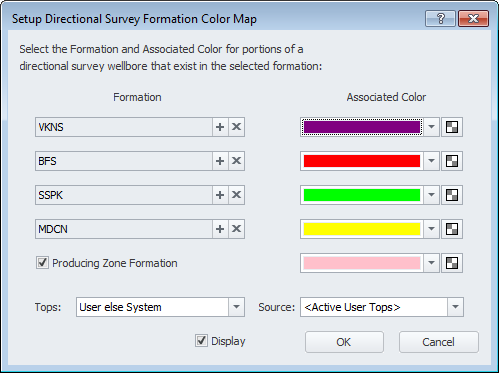
- Click + in the top-most Formation drop-down list to display the dialog box, where you type some or all of the name of the desired formation in the box to the left of the Find button, select the formation name from the matching results, and then click OK to place the formation in the Formation drop-down list above.
You may need to refer to the well's DataCard to determine which formation tops to select.
- To define a zone of two or more formations, click + in the remaining Formation drop-down list boxes and using the Select Formation dialog box, locate the next formation to comprise the zone of interest.
- To clear a formation from a Formation drop-down list, click X to the right of the drop-down list from where to remove the formation name.
- To specify a different color for the formation, click the drop-down list arrow in the Associated Color drop-down list and select the desired color. To change the opacity, click , and then drag the slider as depicted.
- Click the Producing Zone Formation check box to show the producing zone on the wellbore trajectory and select an associated color.
- Select the tops source from either system or user, or user with system tops substituted where user tops are not available. Where user tops are specified as the source, specify the database of user tops to use.
- Ensure that the Display check box is enabled in order for the colored wellbores to appear.
- Click OK to return to the main map window, and then in the bottom-right below the Layer Properties pane, click Apply (
 ).
).
 Related Topics