 To monitor Enerdeq Desktop usage
You can view the number of available and occupied seats for your license as well as the network IDs of Enerdeq Desktop users occupying them. When updating relational and spatial databases, you can use the Resource Monitor tab to determine who's currently logged on and ask them to temporarily log off while you update the database.
To monitor Enerdeq Desktop usage
1. In the Admin Console navigation tree, click Resource Monitor.
The Resource Monitor dialog box appears.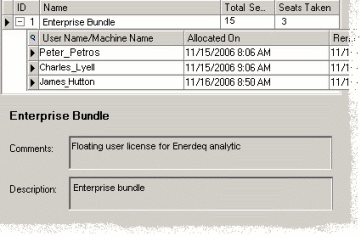
The above dialog box displays the total number of seats for your software bundle versus the number of seats currently occupied.
2. In the display pane, click a software bundle to view the network IDs of users accessing it, the date and time when they started the current session, and the date and time when their seat was last renewed.
3. The above dialog box isn't automatically refreshed so you must periodically click Refresh in the main menubar to ensure you're viewing the most current information.

|
|
