 , or from smallest/least recent to largest/most recent
  ).
).Sort any column by ascending or descending values or letters. Beyond sorting an individual column, you can also sort multiple hierarchical columns so that the first column establishes the grouping criteria for the entire display pane, the second establishes a sub-group within the first group, and so on. For example, you could first group all rows by field name, then group each well that shares the same field by producing zone, and then group all wells that share the same producing zone by status.
To sort items by a column
Click the column header to toggle between ascending and descending order. The triangle in the column header displays the current sort order (from largest/most recent to smallest/least recent , or from smallest/least recent to largest/most recent ).
To sort by more than one column, hold the SHIFT key while clicking column headers.
To sort using the Group By Box
1. Right-click any column header and from the shortcut menu click Group By Box to open a pane above the display panel into which you drag the column headers to sort.
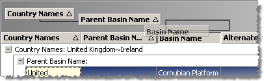
In the Group By Box pane, hierarchy runs from left to right where the left-most column becomes the parent and sorts all rows in the entire Browse list. The column right of it becomes its child and sorts the individual rows within each parent.
If you drag a third column into the Group By Box, it becomes a child of the child to its left and so on. You can change the hierarchy of any column within the Group By Box pane by dragging that column either left or right of another column.
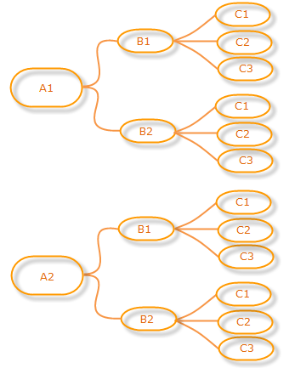
2. Click the column header in the Group By Box pane to toggle between ascending and descending order. The triangle in the column header displays the current sort order (ascending or descending ).
3. To remove hierarchical sorting, do either of the following:
To remove grouping from all columns, right-click an area of the Group By Box pane where there isn't a column header and from the shortcut menu, click Clear Grouping.
To remove grouping from individual columns, right-click the column in the Group By Box pane and from the shortcut menu, click Ungroup.
| About DataCards | About the Browse window |