About Energy Documents
Energy Documents is an essential library of source well file, pressure documents, and fracture information that you access from the S&P Global Energy Portal or while using AccuMap. Launch Energy Documents from AccuMap by inspecting a well and selecting Energy Documents from the context menu, by clicking Energy Documents from the main ribbon of the DataCard with for either a single well or multiple wells, or by clicking Open in Energy Documents from the Lists / Selections tab in the main map.
Energy Documents gives quick access to current and historical well documents sourced directly from government regulatory agencies and updated daily. Filter by document content using enhanced optical character recognition (OCR) searches. At any stage of a project, access well files and pressure test information to help discover opportunities and verify information.
Previously, our website search interface was divided into specific search fields by license, UWI, and area. Now, our website displays a single search box where you type a search term, partial term, or multiple terms, and then click ( ), or press Enter.
The search box let's you search any data field in a source well file, pressure document, or facility with whatever degree of specificity you like. Your search can range from a low to high degree of resolution.
For example,
10-19W4 (a partial UWI in the DLS system),
to
All:montney completion Alberta -pas -pressure -general (wells with completions in the Montney formation in Alberta that do not include PAS, pressure, or general data).
Results are displayed on a flexible data results grid, that can be sorted, grouped, filtered, and customized. The Energy Documents grid displays lat/long using the WGS84 system for surface and bottom hole locations.
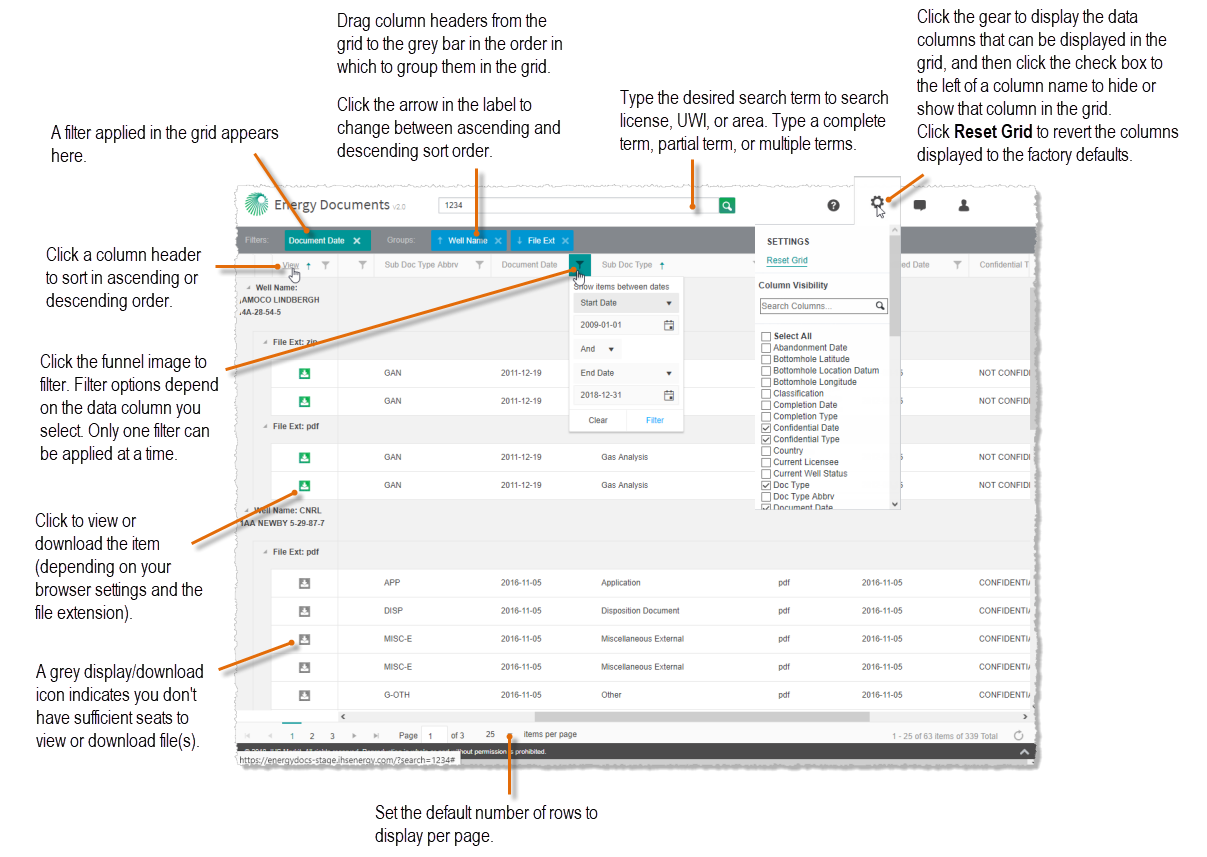
Hover over the image above to enlarge it.
View or download documents by clicking the green display/download icon ( ) that appears in the View column. If the display/download icon is colored grey (
 ), you do not have sufficient seat licenses to view or download the document.
For additional overview details, or to view specific details about a given task, refer to the Related Topics link below.
 Doc Types
Following are the types of documents included in each Doc Type category:
| General | Agreements,
Application, Correspondence, Crown Acquired Worksheet, Disposition Document, Fracture Sand Disposal, Inspection, International Petrodata LTD, |
License,
Mineral Ownership Report, Mineral Whip Report, Minister's Orders, Miscellaneous External, Miscellaneous Internal, Notice of Decision, Notification of Waste Disposal, |
Other,
Permit, Reclamation, Seismic, Sundry Notice, Survey Plat, Velocity Survey, Well Activity Report. |
| Test | Absolute Open Flow,
Acoustic Pressure Test, Acoustic Well Sounder, Annulus Test, Bottom Hole Pressure, Build-Up Test, Cavern Storage Studies, Chemical Analysis, Clean-Up Test, Coalbed Methane Analysis, Core Analysis, Core Photos, Fall-Off Test, Fracture Injection Test (DFIT), Gas Analysis, Gas Migration, |
Gas Pressures,
Gradient, Gradient, Initial Production Test, Injection Capillary Pressure, In-Line Flow Test, Isotope Analysis Report, Leak-Off Test, Oil Analysis, Oil Pressures, Packer Isolation Test, Permeability, Petrography, Pressure Survey Test, Pressure Volume Temperature, Production Log, |
Production Test,
Reservoir Tests, Scanning Electron Microscopy Analysis, Special Core Analysis, Special Drill Cutting Analysis, Surface Casing Gas Migration, Test, Tight Rock Analysis, TMAX, Total Organic Carbon, Transient Gradient, Transient Gradient, Water Analysis, Well Deliverability Test, X-Ray Diffraction. |
| DST | Drill Stem Tests, | Repeat Formation Test. | |
| Drilling | Directional Survey,
Drilling Curves, Drilling Records, Drilling Report, |
Finished Drilling Report,
Formation Tops Logs Run, Geological, Logs, |
New Well Summary,
Synoptic, Tour Sheets. |
| Completion | Completion,
Completion Abandonment, Completions Application, Frac Focus, |
Fracture Fluid Disclosure,
Fracture Report, Fracture Schematic, |
Ground Motion Monitoring Report, |
Sub Doc Type Abbreviations
A full list of the types of data available from Energy Documents appears in the Glossary, and below.
|
Absolute Open Flow (AOF), |
Fracture Injection Test (DFIT) (FRAC-INJ),
Fracture Report (FRAC), Fracture Sand Disposal (FRAC-DISP), Fracture Schematic (FRAC-SCHEMATIC), Gas Analysis (GAN), Gas Migration (GMIG), Gas Pressures (PRES-G), Geological (GEO), Gradient (GRD, SG), Ground Motion Monitoring Report (FRAC-GMMR), Initial Production Test (IP), Injection Capillary Pressure (ICAP), In-Line Flow Test (IN-LINE), Inspection (INSP), International Petrodata LTD (IPL), Isotope Analysis Report (ISO), Leak-Off Test (LEAK), License (LIC), Logs (LOG), Microseismic (FRAC-SEIS), Mineral Ownership Report (M-OWN), Mineral Whip Report (M-WHIP), Minister's Orders (M-ORDER), Miscellaneous External (MISC-E), Miscellaneous Internal (MISC-I), New Well Summary (DRIL-SUM), Notice of Decision (NOTICE), Notification of Waste Disposal (WASTE), Oil Analysis (OAN), Oil Pressures (PRES-O), Other (G-OTH), Packer Isolation Test (PACK-ISO), |
Permeability (PERM),
Permit (PER), Petrography (PET), Pressure Survey Test (PRES-SUR), Pressure Volume Temperature (PVT), Production Log (PLOG), Production Test (PRD), Reclamation (RECLAM), Repeat Formation Test (RFT), Reservoir Tests (RESERVOIR), Scanning Electron Microscopy Analysis (SEM), Seismic (SEIS), Special Core Analysis (CORE-SP), Special Drill Cutting Analysis (DRIL-CUT), Sundry Notice (SUNDRY), Supplementary Well Data (SWD), Surface Casing Gas Migration (GMIG-SURFCASE), Survey Plat (SP, SP-ASDRIL), Synoptic (SYN), Test (T-OTH), Tight Rock Analysis (TRA), TMAX (TMAX), Total Organic Carbon (TOC), Tour Sheets (TOUR), Transient Gradient (DFIT, TRG), Velocity Survey (VEL), Water Analysis (WAN), Well Activity Report (WAR), Well Deliverability Test (DELIV), X-Ray Diffraction (XRD). |
Over time submissions to regulatory agencies have migrated from paper to electronic. Electronic submission enabled S&P Global to categorize submitted documents into more granular sub document types. For example, previously pressure tests were combined into a single PDF as Test data > PRES-G. Now we categorize them into more granular sub document types like AOF, GAN and so on.
If you do not find the specific content you're looking for, search for all documents under the doc type instead of using the sub doc type.
Document Updates
Following is the frequency with which documents for different geographic regions are updated:
| Daily | Weekly | Monthly | As Available |
|---|---|---|---|
| BC Energy Documents | AB Pressure Documents | SK Energy Documents | Territories |
| AB Energy Documents | MB Energy Documents |
Data Coverage
Following are the different types of documents available for different geographic regions:
| Document Category | BC | AB | SK | MB | Territories |
|---|---|---|---|---|---|
| General |
X |
|
X |
X |
X |
| Test |
X |
X* |
X |
X |
X |
| DST |
X |
X* |
X |
X |
X |
| Drilling |
X |
X^ |
X |
X |
X |
| Completion |
X |
X^ |
X |
X |
X |
* - Alberta Pressure documents module
^ - Alberta Energy documents module - drilling and completions for primarily horizontal wells fractured from 2008 to present. Drilling and completions documents prior to 2008 can be ordered at cost through the DMS Order Desk.
Subscriptions
To review which subscriptions are currently enabled for your account, click  to display the following:
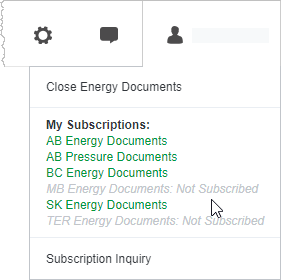
Hover over the image above to enlarge it.
Subscription options colored green in the menu above indicate that you have entitlements and at least one vacant seat for that module. Subscription options colored grey in the menu above indicate that either no seats are available, or that you are not entitled to the data. If you do not have sufficient seats, try again later when a seat is freed up, purchase an additional seat license, or buy the specific data item(s) from the S&P Global Data Management Services desk.
Click Subscription Inquiry to send an email to Customer Support to purchase additional subscriptions or seats.
See Data Coverage for a list of the document types are provided by each Province.
What is a PAS File?
Pressure ASCII Standard (PAS) files are an Alberta-lead initiative started in 1999 to create standardized pressure test submissions using ASCII format files. This format is also used in BC.
The PAS schema defines fields for gas analysis, oil analysis, water analysis, production test data, gradient test data, and absolute open flow/transient test data.
The popular Log ASCII Standard (LAS) file format is based on the PAS initiative.
The regulator defines numerous fields that are categorized within a PAS file. For a list of these fields, refer to http://aer.ca/documents/dds/PASFileFormats.xls
Each test may have several files:
- A PAS file, which is the original format, and that can be viewed using an ASCII text editor such as Notepad, or loaded into third-party applications.
- A PAS View PDF file, which S&P Global generates directly from the original PAS file without and content changes and saves as PDF.
- Any other PAS attachments that the operator chose to submit alongside the PAS.
Click for descriptions of the PAS columns.