Licensing Information dialog box
This dialog box is accessible from the Licensing dialog box.
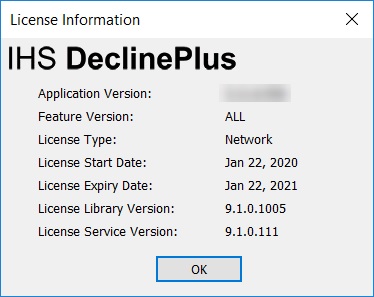
At the top, the name of your licensed application is displayed (DeclinePlus has been used as an example). Beneath this, the following information is displayed:
Application Version — the build number for Harmony.
Feature Version — indicates whether or not a license is version locked. A version of ALL indicates that a license is not version locked and can use any version of Harmony compatible with the Gemalto licensing system.
Version locked licenses (for example, perpetual licenses) have a version number, and can use all versions of Harmony compatible with the Gemalto licensing system up to and including the version number specified.
License Type — indicates a network or standalone license.
License Start Date — the first day the license can be used.
License Expiry Date — the last day the license can be used.
License Library Version — the build number for the license library.
License Service Version — the build number for the license server (only visible for network systems).