Constant-pressure boundaries
A constant-pressure boundary is a boundary that provides pressure support, and this kind of boundary can be used to model reservoirs with aquifer support or waterflooding.
You can introduce constant-pressure boundaries for the following analytical models:
To model constant-pressure boundaries:
1. Expand the Boundary Type group.
The boundary types for North, West, South, and East boundaries are listed.
2. Click the drop-down lists to change the boundary type to Constant Pressure for any of the boundaries.
3. If you set any of the boundaries to be a constant-pressure boundary, the model schematics and calculations change accordingly. No-flow boundaries are displayed in black, and constant-pressure boundaries are displayed in red.
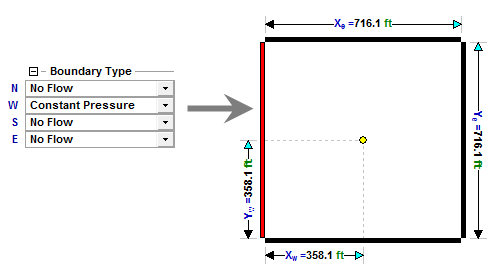
You can switch between boundary types by changing values in the drop-down lists, or by clicking boundaries in the schematics.