Properties editor
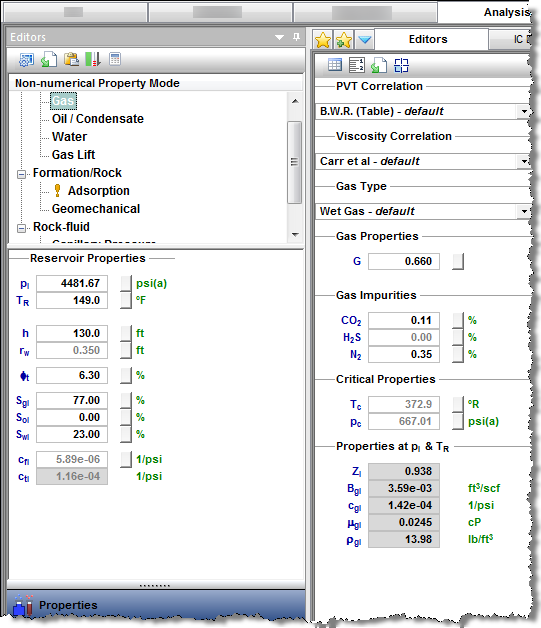
In the Properties editor (located within the Editors pane), you can set properties and correlations for the formation and fluids, as well as reservoir properties.
Toolbars
There are three toolbars associated with the Properties editor: primary, secondary, and plot toolbars.
Primary
The primary toolbar has the following icons:
-
 Change plot options — opens the Plot Options dialog box where you can set your minimum and maximum pressure, as well as your step size. You also have the option to display numerical or non-numerical analysis properties.
-
 Import custom data for any property — you can set most of the property functions either by using a correlation, or by providing a custom table. Click this icon to select the file with a custom table.
-
 Copy to / paste from clipboard — click this icon to copy / paste properties between different wells.
-
 Calculate sandface pressure — Harmony calculates sandface pressure based on given wellhead pressure and fluid rates. These calculations use fluid properties set in the Properties editor. If you change fluid properties, you need to re-run sandface pressure calculations by clicking this icon.
Secondary
The secondary toolbar is located to the right of the Editors pane, and has the following icons:
-
 View Data — toggle between a table view and a plot view.
-
 Toggle Units — toggle between metric and field (imperial) units.
-
Import Data —you can set most of the property functions either by using a correlation, or by providing a custom table. Click this icon to select the file with a custom table.
-
 Change Bottom Left Plot — (gas properties only) toggles the bottom left plot between the Vaporized Oil Ratio (Rv) and Gas Compressibility (cg).
Plot
The plot toolbar is located directly above the plots in the main pane. For more information, see plot toolbars.
Selection tree
The selection tree is located directly below the primary toolbar. After you select a certain node in the selection tree, a corresponding set of properties is displayed in the pane to the right (for example, if you select the Gas node, gas properties are displayed in the right pane). The Reservoir Properties pane is located below the selection tree.
Gas properties
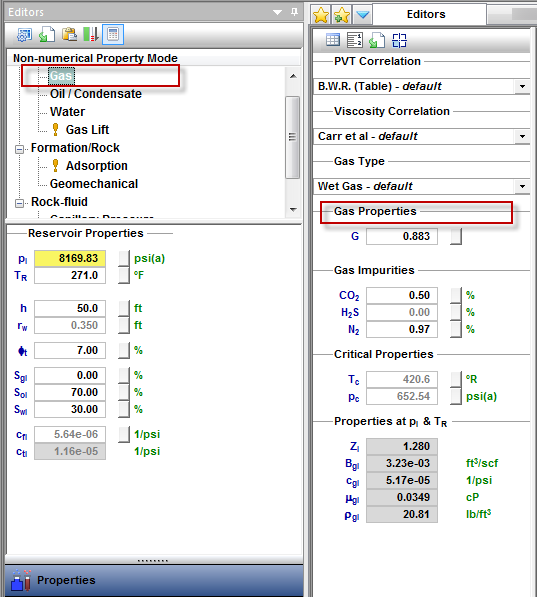
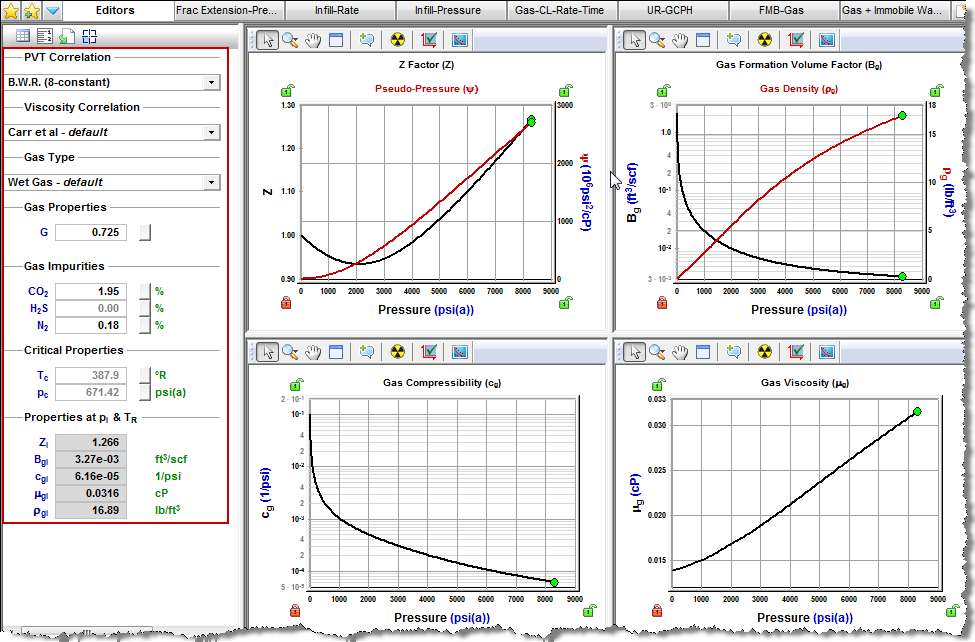
After you select Gas in the selection tree, you can select a PVT correlation, or custom table from the PVT Correlation drop-down list. Use the correlation selection for gas PVT to select the appropriate correlation. If you select Custom Table, you can enter or import your own data.
Similarly, you can select a viscosity correlation, or custom table from the Viscosity Correlation drop-down list. Use the correlation selection for gas viscosity to select the appropriate correlation.
From the Gas Type drop-down list, you can select dry gas, wet gas, or liquid-rich gas.
Gas properties as functions of pressure are calculated based on selected correlations, using the values set for gas gravity (G), critical temperature (Tc), and critical pressure (pc). You can enter these values, or leave the default values calculated by Harmony.
The calculated properties at initial conditions (pi and TR) are displayed in the Properties at pI & TR section.
Gas properties vs. pressure are plotted, including Z, ψ, Bg or Bgd, ρg, cg, Rv, VL / Vsat, and μg.
Additional properties for liquid-rich gas
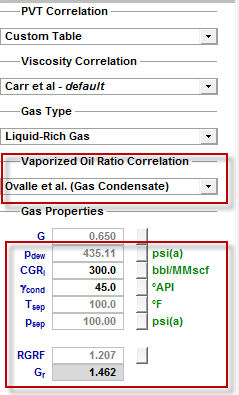
If the Gas Type is set to Liquid-Rich Gas, additional properties are displayed:
- Vaporized Oil Ratio Correlation — defines the amount of liquid vaporized in gas as a function of pressure.
- pdew — dew point pressure. It should be set to the same value as the bubble point pressure defined under Oil / Condensate properties.
- CGRI — condensate gas ratio at the separator.
- γcond — condensate gravity. It should be set to the same value as the oil gravity defined under Oil / Condensate properties.
- Tsep, psep — temperature and pressure at the separator.
- RGRF — recombined gas rate factor. We recommend keeping the default value.
- Gr — recombined gas gravity. All gas property functions are generated based on this gas gravity (as well as critical temperature and pressure).
Correlation selection for gas
There are two correlation selections for gas: PVT and viscosity.
PVT
Various gas PVT correlations are described below:
- B.W.R. (Table) — the Benedict-Webb-Rubin equation is an empirical relationship that predicts the state of liquids and gases. Tables were developed for approximately 50 substances, mostly hydrocarbons that related gas density, formation volume factor, and temperature to pressure.
- B.W.R. (8-constant) — the Benedict-Webb-Rubin (8-constant) equation of state developed a set of generalized coefficients in order to be applied to all types of gases.
- B.W.R. (11-constant) — the Benedict-Webb-Rubin (11-constant) equation of state is a further refined method to predict the state of liquids and gases. It is used for all types of gases, and uses 11 empirical constants to achieve a more accurate interpolation of the data.
- AGA8 Detail — calculates the Z-factor based on the physical chemistry of the gas components at specified temperatures and pressures. It can be used when the exact composition (fraction mole percents) of the gas is available.
- Carbon Dioxide (Table) — the Carbon Dioxide tables are for calculating a Z factor for 100% CO2 content.
- Nitrogen (Table) — the Nitrogen tables are for computing a Z factor for 100% N2 content.
- Hydrogen Sulfide (Table) — the Hydrogen Sulfide tables are for computing a Z factor for 100% H2S content.
- Custom Table — you can enter laboratory measurements for a gas Z factor or formation volume factor. The Z factor is calculated from the formation volume factor or vice versa. Gas compressibility is subsequently calculated from these two values.
Viscosity
Various gas viscosity correlations are described below:
- Carr et al. — developed to predict the viscosity of gas hydrocarbon mixtures for temperatures between 32ºF and 400ºF, and pressures up to 12,000 psi. It applies to both sweet and sour gas, and is designed to handle non-hydrocarbon components (CO2, H2S, N2) in concentrations of up to 15% each.
- Lee, Gonzalez, Eakin — applies to sweet gas, but does not account for the presence of non-hydrocarbon components. It is applicable for a pressure range of 100 - 8,000 psi, and temperatures between 100ºF - 340ºF. It is less accurate for gases with a specific gravity above 1.0.
- Optimized Lee et al. — developed using the Lee, Gonzalez, and Eakin method, but uses an optimized temperature history to achieve more accurate results, thus resulting in different coefficients in the equations. (There is less than a 5% difference in extreme cases from the original correlations.)
- Lucas et al. — uses the method of corresponding states to calculate gas viscosity. It is better suited for higher density gases at lower pressures.
- Custom Table — you can enter custom gas viscosity values from laboratory measurements.
Oil / condensate properties
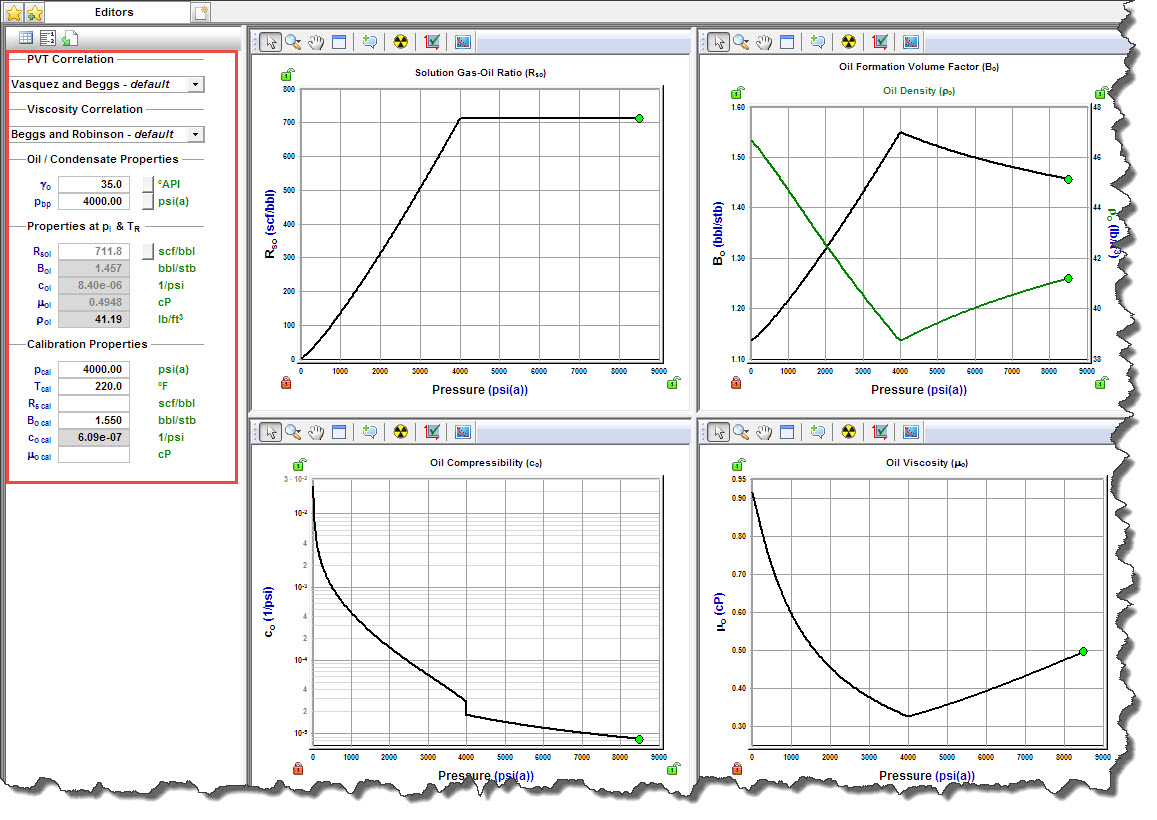
After you select Oil / Condensate in the selection tree, you can select a PVT correlation, constant properties, or custom table from the PVT Correlation drop-down list. Similarly, you can select a correlation, constant properties, or custom table from the Viscosity Correlation drop-down list.
Use the correlation selection for oil to select the appropriate correlation. If you select Custom Table, you can enter or import your own data.
Oil properties vs. pressure are plotted, including Rso, Bo, ρo, co, and μo. The calculated properties at pi and TR are also displayed.
Calibration properties for oil
This functionality is used to calibrate existing correlations for oil PVT and viscosity to anchor them to a certain (known) value. This is usually done when you have some custom data for oil properties, and want to calibrate oil correlations to match custom data as closely as possible.
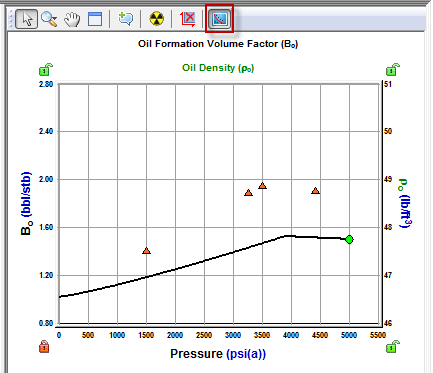
To see if the selected correlation is close to the custom data you entered, click the Show the Custom Data Points icon on the plot toolbar.
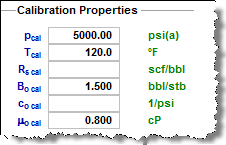
In the Calibration Properties section, these fields are displayed:
- pcal and Tcal — calibration pressure and temperature.
- Rs cal — the correlation curve for the solution gas-oil ratio (Rs) shifts such that Rs(p=pcal, T=Tcal)=Rs cal.
- Bo cal — the correlation curve for the oil formation volume factor (Bo) shifts such that Bo(p=pcal, T=Tcal)=Bo cal.
- co cal — the correlation curve for oil compressibility (co) shifts such that co(p=pcal, T=Tcal)=co cal.
- μo cal — the correlation curve for oil viscosity (μo) shifts such that μo(p=pcal, T=Tcal)=μo cal.
Correlation selection for oil
There are two correlation selections for oil: PVT and viscosity.
PVT
Various oil PVT correlations are described below:
- Vasquez and Beggs — developed from field data (from locations all over the world). It is generally applicable for all oil types, and covers a wide range of pressures, temperatures, and oil properties.
- Al-Marhoun — developed for Saudi Arabian oils. It is valid for all types of gas-oil mixtures ranging from 14 - 45 ºAPI.
- De Ghetto et al. — developed for heavy oils (10 < °API < 22.3) and extra-heavy oils (°API < 10) from the Mediterranean Basin, Africa, and the Persian Gulf. It requires separator pressure and temperature.
- Glaso — developed for North Sea oils. It is suitable for oil mixtures ranging from 22-48 ºAPI, and is valid for all types of oil and gas mixtures after correcting for non-hydrocarbons in the surface gases, and the paraffinicity of the oil.
- Hanafy et al. — developed for Egyptian oils gathered from the Gulf of Suez, Western Desert, and Sinai regions. It is independent of oil gravity and reservoir temperature. Although the authors claim that the correlations are applicable to a wide range of crude oils ranging from heavy to volatile oils (14.3 – 47 ºAPI), it appears to be more applicable to light oils.
- Petrosky and Farshad — developed for Gulf of Mexico oils gathered from offshore regions in Texas and Louisiana. It is applicable for oil mixtures ranging from 16 - 45 ºAPI, and provides improved results for the Gulf of Mexico oils compared to Standing, Vasquez and Beggs, Glaso, and Al-Marhoun correlations.
- Standing — developed for California oils. It is applicable for oil mixtures ranging from 16 - 64 ºAPI.
- Velarde et al. — developed for black oils. It is applicable for oil mixtures ranging from 12 - 55 ºAPI.
- Constant Properties — you can enter values for the oil compressibility, solution gas-oil ratio, and oil formation volume factor at initial reservoir conditions.
- Custom Table — you can enter laboratory measurements for the oil compressibility, solution gas-oil ratio, and oil formation volume factor.
Viscosity
Various oil viscosity correlations are described below:
- Beggs and Robinson — developed from field data (from locations all over the world). It is generally applicable for all oil types, and covers a wide range of pressures, temperatures, and oil properties.
- De Ghetto et al. — developed for heavy oils (10 < °API < 22.3) and extra-heavy oils (°API < 10) from the Mediterranean Basin, Africa, and the Persian Gulf. It requires separator pressure and temperature.
- Hanafy et al. — developed for Egyptian oils gathered from the Gulf of Suez, Western Desert, and Sinai regions. It is independent of oil gravity and reservoir temperature. Although the authors claim that the correlations are applicable to a wide range of crude oils ranging from heavy to volatile oils (14.3 – 47 ºAPI), it appears to be more applicable to light oils.
- Khan et al. — developed using oil samples collected from Saudi Arabian reservoirs. It gives more accurate predictions for Saudi Arabian oils, compared to the Beggs and Robinson.
- Ng and Egbogah — this correlation contains two methods for calculating dead oil viscosity using a modified Beggs and Robinson viscosity correlation, and a correlation that uses the pour point temperature, which is the lowest temperature at which the oil is observed to flow when cooled. The purpose of introducing the pour point temperature into the correlation is to reflect the chemical composition of crude oil into the viscosity correlation. To obtain the viscosity for live oils, the dead oil correlations are used with the Beggs and Robinson viscosity correlation. This correlation is applicable for oil mixtures ranging from 5 - 58 ºAPI.
- Constant Properties — you can enter a value for oil viscosity at initial reservoir conditions.
- Custom Table — you can enter laboratory measurements for oil viscosity.
Water properties
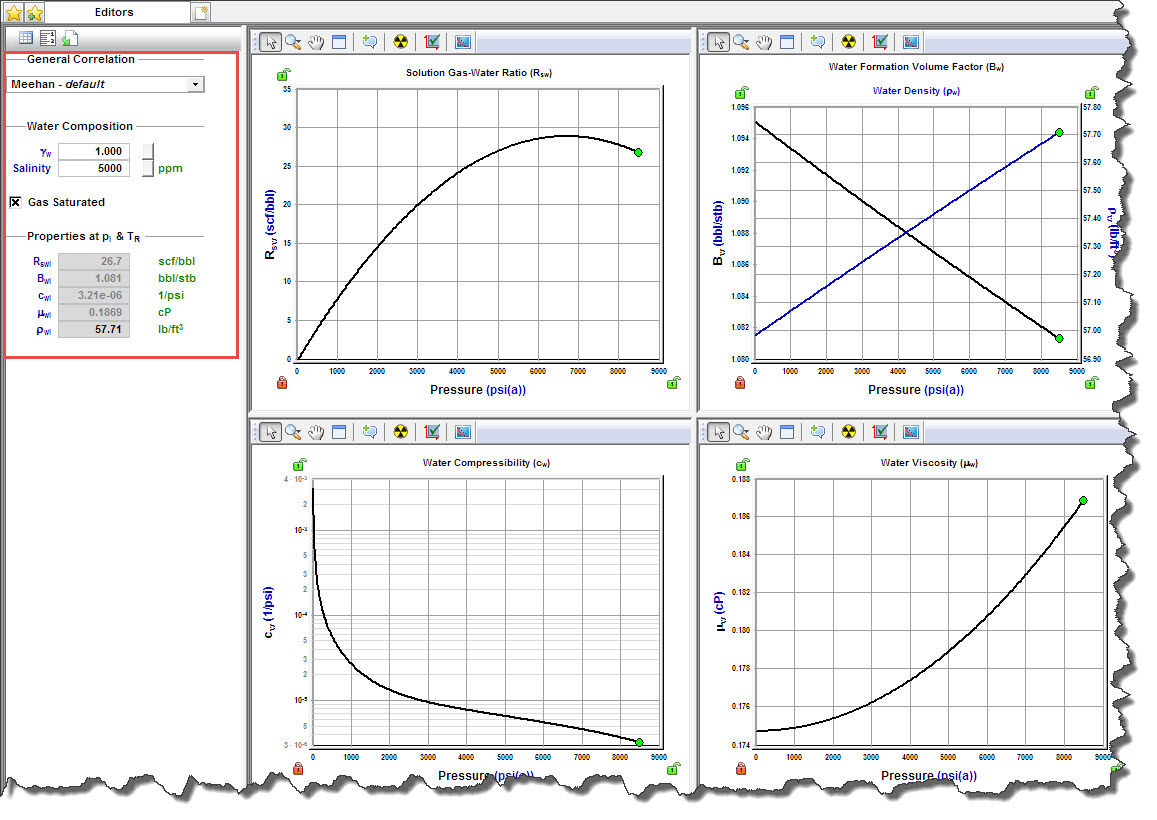
After you select Water in the selection tree, you can select a correlation, constant properties, or a custom table from the General Correlation drop-down list.
Water properties vs. pressure are plotted, including Rsw, Bw, ρw, cw, and μw. The calculated properties at pi and TR are also displayed.
Gas lift properties
After you select Gas Lift in the selection tree, simplified gas properties are listed, to be used on analyses with gas lift. Only limited options are available for PVT Correlation, Viscosity Correlation, and Gas Type.
Note: It you want to change the PVT Correlation or Viscosity Correlation for your gas lift, you must change these selections in gas properties.
Adsorption properties
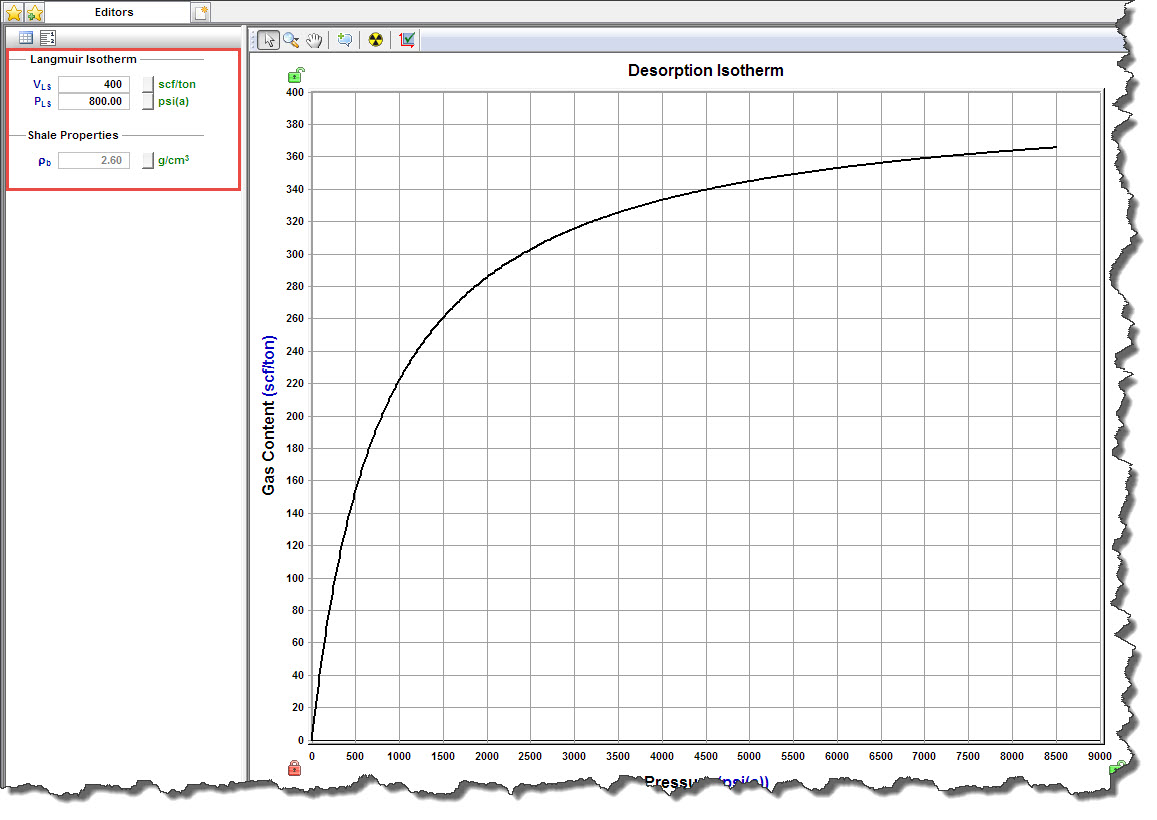
After you select Adsorption in the selection tree, these properties are displayed:
- VLS, PLS — Langmuir volume and Langmuir pressure (for shale). For more information, see Langmuir isotherm.
- ρb — bulk density (for shale).
Gas content vs. pressure is plotted.
Geomechanical properties
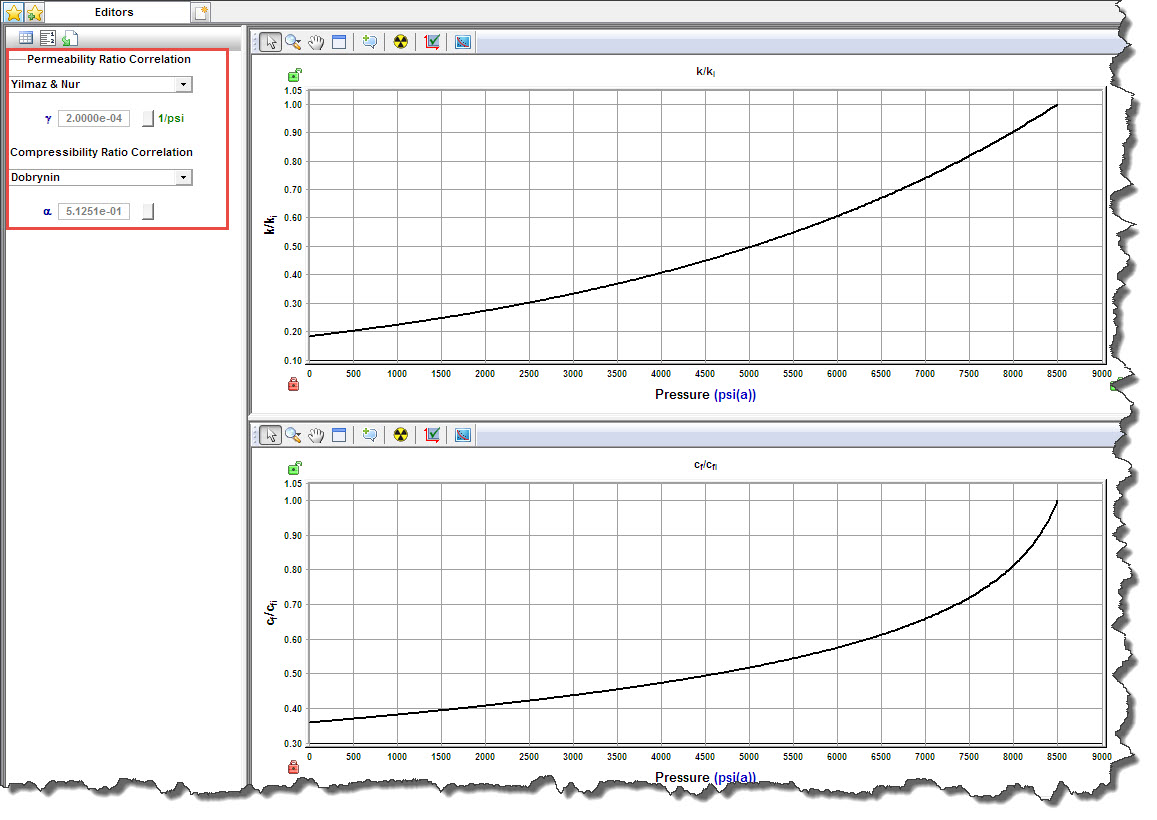
After you select Geomechanical in the selection tree, you can set how rock properties (permeability and formation compressibility) vary with pressure.
- Permeability Ratio Correlation drop-down list — select a correlation for the variation of permeability with pressure.
- Compressibility Ratio Correlation drop-down list — select a correlation for the variation of formation compressibility with pressure.
- α — Biot effective stress coefficient (for Dobrynin correlation). The larger this parameter is, the more permeability and formation compressibility vary with pressure.
- γ — permeability modulus (for the Yilmaz & Nur correlation). The larger this parameter, the more permeability varies with pressure.
For more information, see Geomechanical reservoir models.
Geomechanical properties vs. pressure are plotted, including k / ki and cf / cfi.
Relative permeability properties
After you select Relative Permeability in the selection tree, you can set correlations and parameters describing relative permeability between different fluids flowing together.
- 2-Phase Model Correlation drop-down list — select a relative permeability correlation. For more information, see relative permeability correlations.
- (located at the bottom of the pane) 3-Phase Model Correlation — defines how given 2-phase relative permeabilities are combined to calculate permeability for each phase for the cases when all three phases (oil, gas, and water) are flowing together. For more information, see three-phase correlations.
Water-gas section
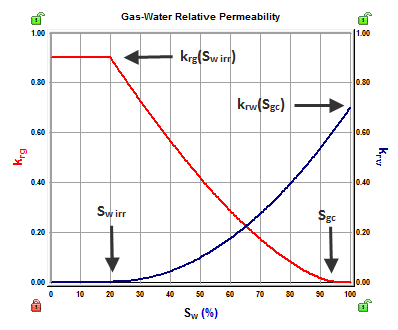
Parameters in the Water-Gas section describe relative permeabilities for the case when water and gas are flowing together:
- Sw irr — irreducible water saturation. This is the immobile water when gas is the displacing fluid.
- Sgc — critical gas saturation. This is the minimum saturation for gas to become mobile.
- krw(Sgc) — water relative permeability at Sgc.
- krg(Sw irr) — gas relative permeability at Sw irr.
- nw — water relative permeability exponent. This parameter describes how much the water relative permeability curve bends.
- nq — gas relative permeability exponent. This parameter describes how much the gas relative permeability curve bends.
Oil-gas section
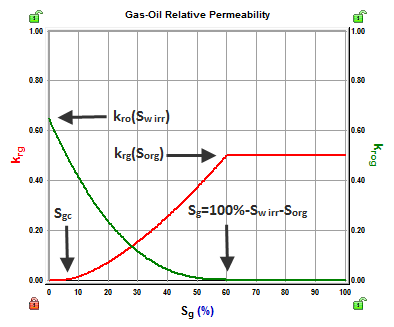
Parameters in the Oil-Gas section describe relative permeabilities for the case when oil and gas are flowing together:
- Sw irr — irreducible water saturation. This is the immobile water when oil or gas is the displacing fluid.
- Sorg — residual oil saturation to gas. This is the immobile oil when gas is the displacing fluid.
- Sgc — critical gas saturation. This is the minimum saturation for gas to become mobile.
- kro (Sw irr) — oil relative permeability at Sw irr.
- krg (Sorg) — gas relative permeability at Sorg.
- nog — oil relative permeability exponent to gas. This parameter describes how much the oil relative permeability curve bends.
- nq — gas relative permeability exponent to gas. This parameter describes how much the gas relative permeability curve bends.
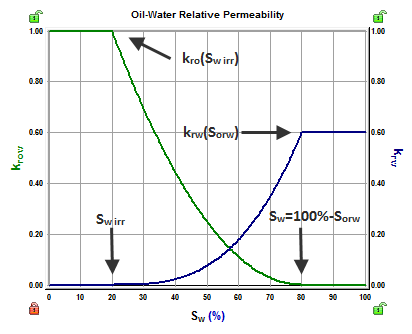
Water-oil section
Parameters in the Water-Oil section describe relative permeabilities for the case when oil and water are flowing together:
- Sw irr — irreducible water saturation. This is the immobile water when oil is the displacing fluid.
- Sorw — residual oil saturation to water. This is the immobile oil when water is the displacing fluid.
- krw (Sorw) — water relative permeability at Sorw.
- kro(Swirr) — oil relative permeability at Swirr.
- nw — water relative permeability exponent. This parameter describes how much the water relative permeability curve bends.
- now — oil relative permeability exponent to water. This parameter describes how much the oil relative permeability curve bends.
IHS Harmony Enterprise™ 2017.3 | Last revised: October 18, 2017
Copyright © 2017 IHS Markit Ltd. All rights reserved.
 Click to see subtopics: