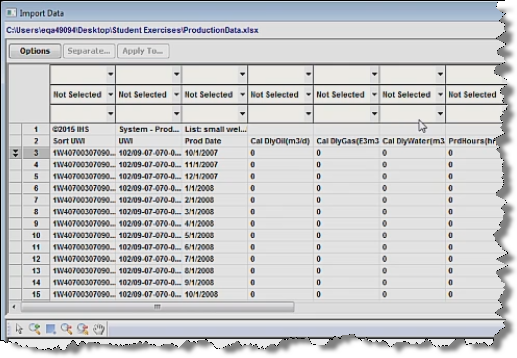
Import Data dialog box
This dialog box is commonly used when you import well data from a file. The main purpose of this dialog box is to assign column headers (by clicking the drop-down arrows) to your data, which brings this data into Harmony.
Toolbar
This dialog box has these items on its toolbar:
-
 Open folder — lists two options:
- Reset and Open — closes the existing imported file and opens the Open File to Import dialog box.
- Open Another File — opens the Open File to Import dialog box.
-
 Discard Changes — clears all content in the table / grid.
- Options — opens the Import Options pane.
- Separate (Production data only with multiple wells in one file; not applicable to attributes) — if you specify a Well Identifier for your first column and click Separate, multiple wells in the same file are listed as tabs, which divides the single import file into multiple entities for import.
- Apply To — applies the column headers you have set in one worksheet to all of the other worksheet tabs in the spreadsheet file. The single import file generates multiple entities for importing, with each one named according to the original worksheet name.
Import Options pane
In this pane, you can change import options, including the standard operating conditions of the file to be imported, and the configuration of the unit list.
Rows
(You can also right-click rows to set this range.)
- Start Import from row — set the first row number in the table that you want to import.
- End Import at row — set the last row number in the table that you want to import.
Format
- Save format for this file while importing — saves your column and row mapping for this file.
- Save current format as default while importing — saves your column and row mapping as the default setting for other files.
- Remove default format (if it exists) while importing — resets your settings, so you can remap columns and rows.
- Save current format as — saves your current mapping as a template.
- Saved Formats — select the saved formats you want to apply or delete.
- Multi-level unit picker — when selected, the column-mapping menus display the menu items horizontally in multiple columns, instead of the default setting of a single vertical column.
- Continuous time track — this option is selected by default for cumulative time. If you deselect this option, gaps in your order, as determined by irregularities in the data sampling interval, are interpreted as shut-ins. For additional information, see continuous time track.
- Sample interval for Date / Time matching — we recommend keeping the default setting. This option specifies the interval for comparisons. For example, every 50 rows a comparison is performed on the date / time column to verify if the format is acceptable.
- Date / Time Sensitivity Level — we recommend keeping the default setting. You can use the slider to specify how closely a format has to match. For example, a 100% setting means that the imported file has to match your format exactly.
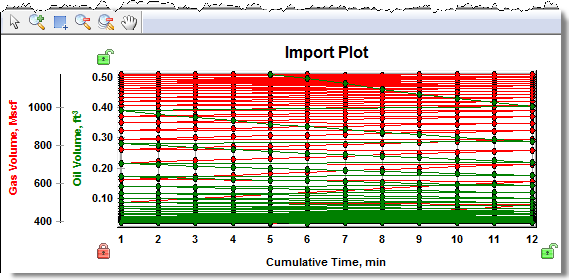
Plot pane
In this pane, your column selections are plotted as long as you have populated x- and y-axis data in your table / grid.
IHS Harmony Enterprise™ 2017.3 | Last revised: October 18, 2017
Copyright © 2017 IHS Markit Ltd. All rights reserved.
 Click to see subtopics: