 ) on the Hybrid Model pane's toolbar), the history plot displays a new sparse set of production data to be used for calculations:
When using sparse data, the hybrid model uses coarse timesteps for calculations, and each coarse timestep contains n points.
| Note: | We recommend using sparse production data when running automatic parameter estimation (APE). |
After you enter a value for n in the Use Sparse Production Data dialog box (opens when you click the Use Sparse Data icon () on the Hybrid Model pane's toolbar), the history plot displays a new sparse set of production data to be used for calculations:
To ensure that the sparse dataset represents the actual production history, adjust the value for n, as required.
Click the Synthesize icon ( ) to run the model. Note that the calculated results correspond to coarse timesteps.
If you run APE, each calculation runs using coarse timesteps based on your n value.
| Note: | Your weighting and point selection are honored when running APE using sparse data. |
While calculation results are slightly less accurate, the calculations run faster. After APE finds a match using sparse data, you can run one calculation using the entire production dataset (n = 1) to ensure that the match is still good.
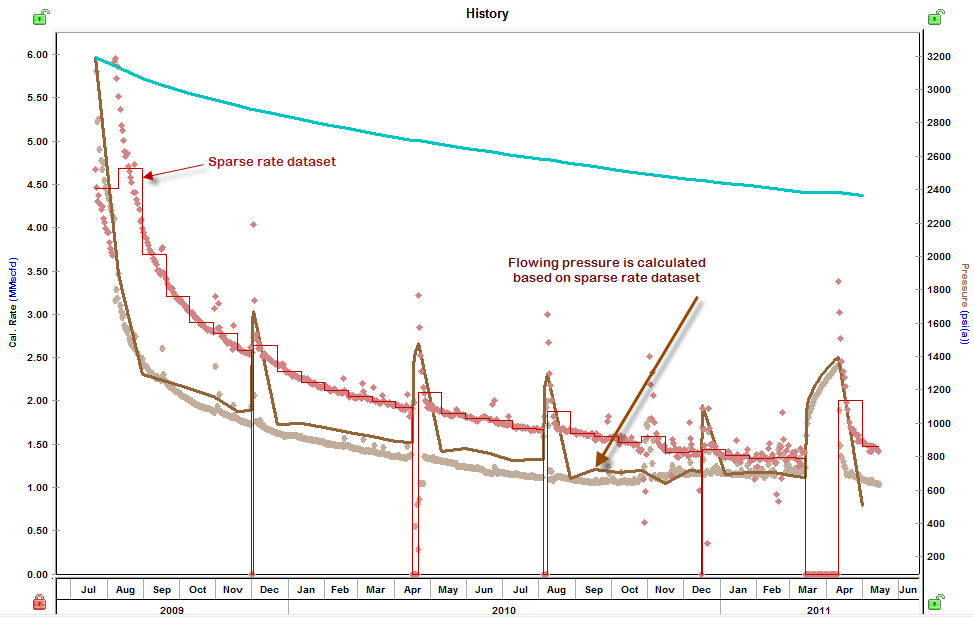
For Use Rate mode: Drawdowns are divided in coarse timesteps. Coarse timesteps contain n points, and the rate for each timestep is calculated as "total volume produced over the timestep" / "duration of the timestep". For buildups, all of the production data is used.
For Use Pressure mode: Drawdowns are divided in coarse timesteps. Coarse timesteps contain n points, and the pressure for each timestep is calculated as "last-measured pressure of the timestep". For buildups, all of the production data is used.
| Tip: | You can select a rate or pressure in the Calculation Method section. |
IHS Harmony Enterprise™ 2018.1 | Last revised: March 20, 2018
Copyright © 2018 IHS Markit Ltd. All rights reserved.