Static pressure editor
In the Static Pressure editor (located within the Editors pane), you can view, enter, and modify static pressures for wells. Static pressures can also be viewed at the group level, but not manipulated.
The Editors pane on the left-side has a list of data series that you can select to be displayed in the table. By default, all of the series are selected to be displayed. In addition, the following columns are always displayed (that is, they cannot be hidden): test date, static run depth pressure, run depth, use in analysis, static sandface pressure, and static pressure at datum).
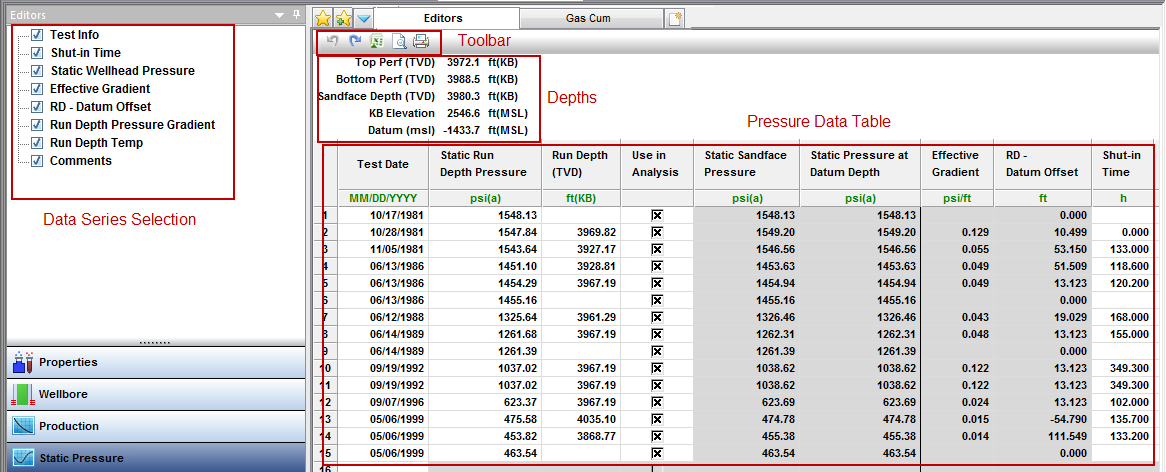
Depths
The perforation intervals, sandface depth, kelly bushing (KB) elevation, and datum for the entity are displayed above the pressure data table. Some import file types (such as *.mer) include this well data. When it is not imported, the data that is specified in the Wellbore editor is used to populate these values. For wells, the sandface depth midpoint of perforation (MPP) is assumed to be the same as the datum depth. When a group is viewed, a common datum is determined for the group based on the datum of each well. No sandface depth is displayed for a group, as it is not meaningful.
Header
These items are displayed above the table in the main pane:
- Top Perf (TVD) — the uppermost perforation depth from the Attributes tab or the Wellbore editor. (The Wellbore editor's perforation interval inputs override the Attributes tab's inputs.) The top perf depth is converted from measured depth (MD) to true vertical depth (TVD) based on the Deviation Survey entered in the Wellbore editor.
- Bottom Perf (TVD) — the lowermost perforation depth. The bottom perf depth is converted from MD to true vertical depth TVD based on the Deviation Survey entered in the Wellbore editor.
- Sandface Depth (TVD) — the midpoint of the perforated interval (MPP). You cannot change the Sandface Depth in the Static Pressure editor by changing the Datum Depth in the Wellbore editor. It is calculated based on top and bottom perf inputs (form the Attributes tab or Wellbore editors) only. You cannot type a fixed reservoir datum depth.
- KB Elevation — the kelly bushing (KB) reference elevation. All datum calculations reference the KB elevation.
- Datum (msl) — the true vertical depth relative to mean sea level (msl). This value changes depending upon the launched entity as described below:
- For Well entities: "Datum" depth is always the Sandface or MPP depth in TVD for the well. This is not the Datum Depth referred to in the Wellbore editor.
- For Group entities: "Datum" depth is calculated from the average well Datum Depths of the wells in the group. As group membership changes, the group datum depth changes. The intention is to automatically minimize the Datum Depth correction required for each well in the group. You cannot type a fixed reservoir datum depth.
Pressure data table
The minimum requirements for an entry in the pressure table are a date and a static run depth pressure. Additional information that can be provided includes the run depth, shut-in time, static wellhead pressure, run depth pressure gradient, run depth temperature, comment, and test info.
In the Use in Analysis column, you can select which static pressures are displayed on worksheets and which are used in the analysis. By default, all static pressures are selected.
When a run depth is not provided, the run depth is assumed to be the same as the datum. When a run depth is available, the run depth pressure gradient is used to convert the static pressure at the run depth to a datum pressure. The same approach is used to convert static pressures from a well datum to a group datum. When the run depth pressure gradient is not provided (or if the input value is 0), fluid properties from the Properties editor are used to estimate a pressure gradient.
Column headers
Column headers are defined as follows:
- Static Run Depth Pressure — the gauge measured pressure in absolute pressure units.
- Run Depth — the depth of the gauge used to measure the static pressure.
- Static Sandface Pressure — the Run Depth Pressure corrected to the Sandface Depth or MPP of a launched well entity.
- Static Pressure at Datum Depth — the Run Depth Pressure corrected to the Datum Depth for a launched group entity. You cannot type a fixed reservoir datum depth. The Static Pressure at Datum Depth for a well entity, or a group with only one well, is always the same as the Static Sandface Pressure. The Static Pressure at Datum Depth and the Static Sandface Pressure are only different when there are multiple wells in the group with differing MPPs based on datum depths.
- Effective Gradient is either:
- (a) the “Run Depth Pressure Gradient” you entered, or
- (b) An internally calculated gradient based on the specified Primary Fluid in the Attributes tab, the input Run Depth Pressure, the reservoir temperature in the Properties editor, as well as inputs in the Wellbore and Fluid Properties editors.
- We use (a) when the Run Depth Gradient contains a non-zero value
- We use (b) when the Run Depth Gradient contains a zero, or is blank.
- Static Wellhead Pressure— you can type a value for information purposes. In rare circumstances, we have only measured well static pressure data and no gauge measured data. In those cases, you can copy / paste the Static Wellhead Pressures over to the Run Depth Pressure column. If you specify a Run Depth of "0" (zero) and set the Primary fluid to gas, oil, or water, Harmony Enterprise calculates Sandface and Group Datum pressures based on sandface depth (MPP) and the Effective Gradient. This method can be used for gas, oil, or water, but generally should only be used for gas. It also assumes there are no wellbore or reservoir fluid contacts between the wellhead and the calculated datum depth.
- Run Depth Pressure Gradient — the pressure gradient measured at or near the gauge depth in the wellbore. You should be careful when using imported values, as these gradients generally reflect wellbore fluid contacts, and not necessarily the fluid contacts in the reservoir.
|
Note:
|
The remainder of the column headers are provided for information only, and are not used in the calculations. |
IHS Harmony Enterprise™ 2018.1 | Last revised: March 20, 2018
Copyright © 2018 IHS Markit Ltd. All rights reserved.
 Click to see subtopics: