You are here: Components > Reference dates dialog box
Reference dates dialog box
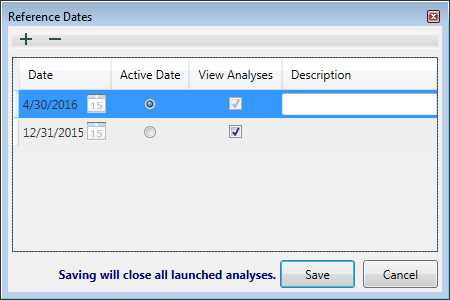
In this dialog box, you set the effective date for reserves evaluation, and you can access it by clicking the Reference Dates icon ( ) on the main toolbar.
Toolbar
This dialog box has these items on its toolbar:
-
 Add reference date
- Add New Reference Date — adds a reference date, by default, at the end of the current month.
- Duplicate from previous reference date — adds a reference date with a copy of the analyses from the most recent previous date. Cumulative volumes at the reference date are determined for the copied analyses using the precedence specified (IP-2P-3P or 2P-1P-3P).
-
 Remove reference date — deletes the reference date currently selected.
Grid columns
The reference dates you add are listed in the table / grid and are shared between all users.
- Date — only the most recent date is editable by clicking the Calendar icon (
 ). Note that after the Save button is clicked, the date specified gets committed and cannot be changed.
- Active Date — specifies which date is used when classifying analyses. Only one reference date can be specified as the Active Date. The chosen date is user-specific (it is not shared), and no date is selected by default.
- View Analyses — toggle the View Analyses checkboxes to show or hide analyses with a particular reference date.
- Description (Optional) — type a name for your reference date in the Description field.
Note that clicking Save closes all open analyses.
IHS Harmony™ 2016b Multi-User | Last revised: October 19, 2016
Copyright © 2016 IHS Inc.
 Click to see subtopics: