 Click to see subtopics:
By default, the Status Window is docked at the bottom of Harmony's content pane. The Status Window displays short descriptive messages pertaining to the current state of the project, or the results of actions as you perform them.
Note: To hide or show the Status Window, click the View menu, Toolbars and Docking Windows, Status Window.
When you right-click a message in the Status Window you can select various options from the context menu.
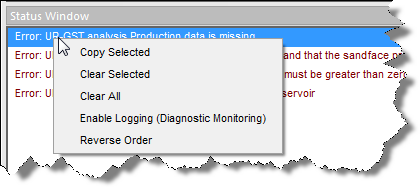
There are three categories of messages:
1. Normal — operations that are running correctly. No action is required.
2. Warning — operations that can run, but may give erroneous results due to invalid or missing parameters. Corrective action is likely required.
3. Error — operations that cannot be completed. Corrective action is required to resolve the error.

Note: You can double-click some issues to go to the problem area as soon as the issue arises.
IHS Harmony™ 2016b Multi-User | Last revised: October 19, 2016
Copyright © 2016 IHS Inc.