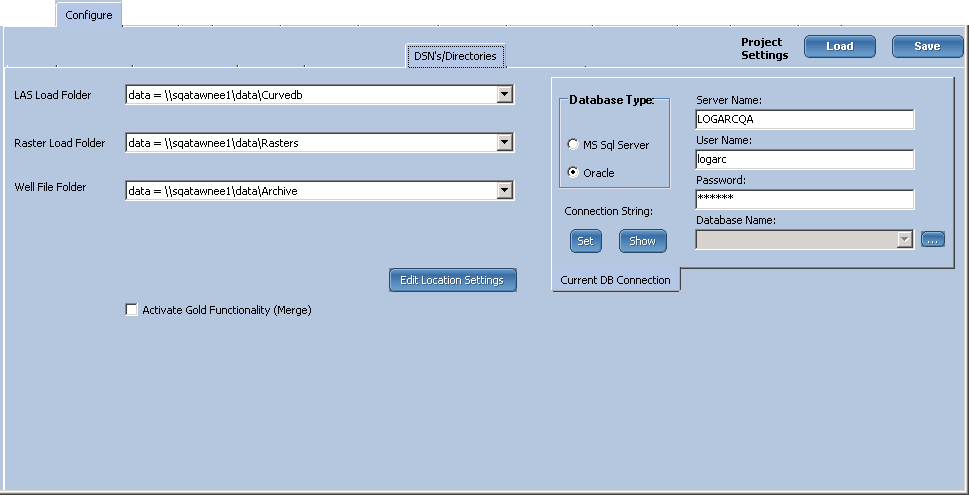
The Activate Gold Functionality option creates a set of pre-extracted LAS files, processed using the optional features of a standard LOGarc LAS retrieval, and stores these files in a Merge directory grouped in county folders rather than UWI level. The benefit is instant, direct access to large blocks of merged, normalized LAS files for immediate project loading.
When the Gold Functionality is activated, as each LAS file is loaded, the load process is immediately followed by an output process that generates a normalized LAS file, based on the retrieve settings. Since these files are processed in advance, there is no need to wait for LOGarc to generate them. End-users can directly access these LAS files, in large numbers, from the output county directories.
The Activate Gold Functionality option is enabled on the DSN/Directories tab in Configuration.
When activated, the following additional options are displayed on the DSN's/Directories tab:
| Retrieve Settings and Output Conversion | Configure the retrieve settings to normalize the LAS output as desired. |
| Merge-DB Connection | Defaults to match your normal loading database. Enter new information if required. |
| LAS Merge Archive Folder | Specify a location. This folder is normally located with the other LOGarc folders. |
In addition, the following options are added to the listed tabs:
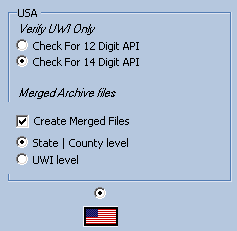
| Configure > Load Configuration > USA | Under Merged Archive files, select what folder structure option you prefer – State|County level, or UWI level. |
| Configure > Load Configuration > Canada | By default, Merged LAS files for Canadian wells are created down to the UWI level. |
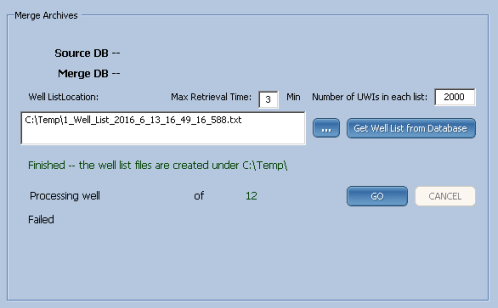
| Admin > Merged Archive (this tab only appears if Activate Gold Functionality is enabled) |
Processes historic-loaded LAS files to generate a merged output LAS for each UWI. This feature functions the same way as that for processing historic SIF to DRAs generate a set of UWI lists, process each list. |
|
|
|
Configure > Load Configuration |
Admin > Merged Archive Tab |

IHS Markit™
 Related Topics