LOGarc Client
LOGarc is a client-server application that enables you to search and retrieve well log data from the LOGarc database. Any type of data that can be associated with a given well ID can be loaded into LOGarc: LAS files; raster images; calibration files; well reports, and so on. LOGarc can then search and retrieve these files.
Following is an architectural view of the entire LOGarc framework, including the LOGarc client in the lower-left of the image:
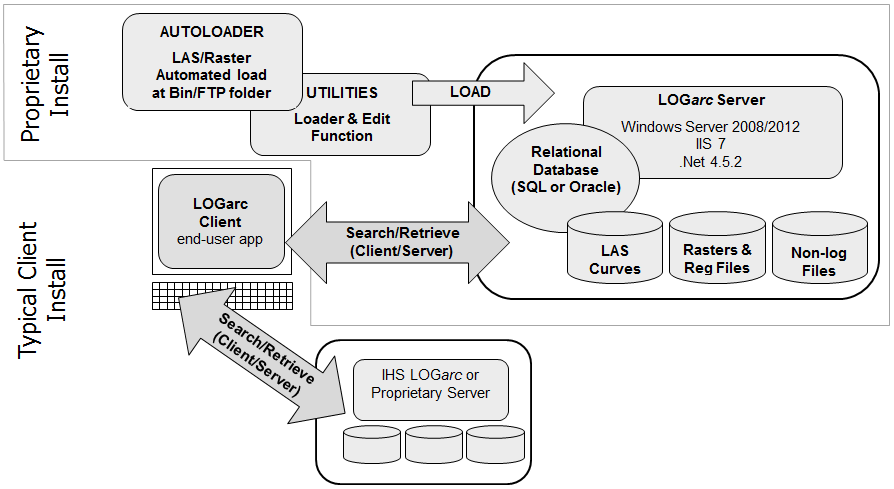
The two LOGarc modes are Search and Retrieve.
The LOGarc screen consists of four main sections:
- LOGarc Menus - modify the program settings: change the search result grid display and search mode.
- Search Parameters - specify the well location by State/County (USA), by land survey system, or by well list.
- Curve Constraints - select constraints to limit the curve data that will be displayed or selected for retrieval such as display wells with data only or display raw data only.
- Search Results Grid - displays the well and curve data.
The LOGarc administrator must create and configure the database and client account settings using the LOGarc web service before you can search and retrieve data.
Please do not change the account settings unless advised to do so by your internal LOGarc support representative.
 Related Topics

IHS Markit™