Wellhead deliverability
To forecast changes in gas inflow with changes in pressure, the pressure squared methodology is used. Wellhead Test and Wellhead C,n use the same mathematical relationship; however selection of Wellhead Test, or Wellhead C,n is dependent on available data. If you have representative inflow data from a pressure transient analysis (PTA), select Wellhead C,n; if you only have stabilized inflow rates, select Wellhead Test. This methodology must only be used for gas wells that have reached boundary-dominated flow, and when you do not need to account for production through the wellbore. For more information, see wellhead deliverability.
To use welhead deliverability:
| Note: | You must have Wellhead Test or Wellhead C, n wells in your model. For more information on adding these wells to your model, see editing the map, or converting nodes to facilities. You can also add these well through the well editor. For more information, see well inputs. |
1. Click the Wells menu, select Well Editor and then click Well Deliverability.
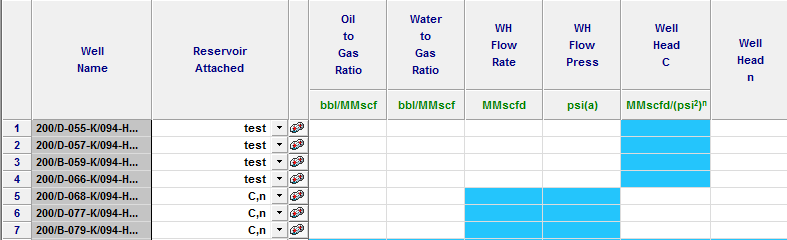
2. Select a wellhead test or wellhead C, n well for the well type. Select a reservoir from the drop-down list in the Reservoir Attached column, and then click the Reservoir icon ( ).
).
If you have not added a reservoir to your model, see reservoirs.
3. Enter all reservoir parameters except the recovery factor.
These parameters are used to calculate the current and forecast reservoir pressure. The reservoir depth is used to convert between reservoir and surface static pressures.
4. Click the Gas Compositions icon ( ) and enter the recombined reservoir properties (CO2, H2S, N2). Click OK in the Gas Compositions and in the Reservoirs dialog boxes.
Depending on your well selection, not all parameters are used in forecast calculations. For example, wellhead test wells do not use wellhead C, and wellhead C,n wells do not use wellhead flow rate and wellhead flow pressure.
5. Click OK.