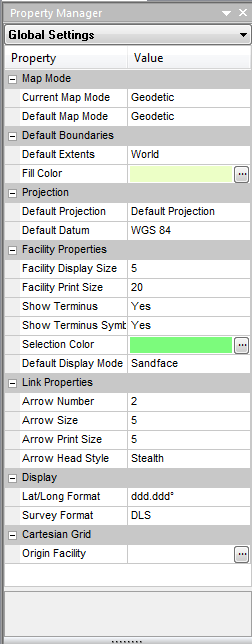
Properties
The Property Manager pane, Properties, displays the following:
- Current Map Mode – the currently selected map mode: Cartesian or GIS
- Default Map Mode – the default map mode selection, Cartesian or GIS, applied to new models
- Default Extents – the default borders used when a new file is created, or when Piper is first loaded.
- Fill Color - the color used to display the world border layer
- Default projection - the default projection (Mercator) used to map the earth's surface
- Default Datum – the default datum selection applied to new models
- Facility Display Size – the size of the facility. You can also adjust this setting by clicking the Properties menu, and selecting Customize.
- Facility Print Size – the size of the facility that is printed. You can also adjust this setting by clicking the Properties menu, and selecting Customize.
- Show Terminus – shows the well location at the sandface and wellhead
- Show Terminus Symbol – designates the terminus location with SF for sandface, or WH for wellhead
- Selection color - the color used to display selected facilities
- Default Display Mode – toggles the terminus display between wellhead or sandface
- Arrow Number - based on the link length, the maximum number of arrow heads to display per link
- Arrow Size – the size of the flow arrows that are printed
- Arrow Print Size - the size of the arrow that is printed
- Arrow Head Style - the style of the arrow head (Stealth, Filled, or Open)
- Lat/Long Format – the lat / long display format
- Survey Format - the default survey display format
- Origin Facility – the facility selected as the (0, 0) origin for the Cartesian grid