Anchoring in Advanced Analytical Models
Anchoring is a technique for improving the efficiency of the history-matching process. You can specify a measured pressure and WellTest will calculate the initial synthetic pressure, which results in the model line going through that specified pressure. This specified measured pressure is known as the anchor point.
In the advanced suite of analytical models within WellTest, an anchor point is added by clicking the Anchor icon on the History Plot toolbar.
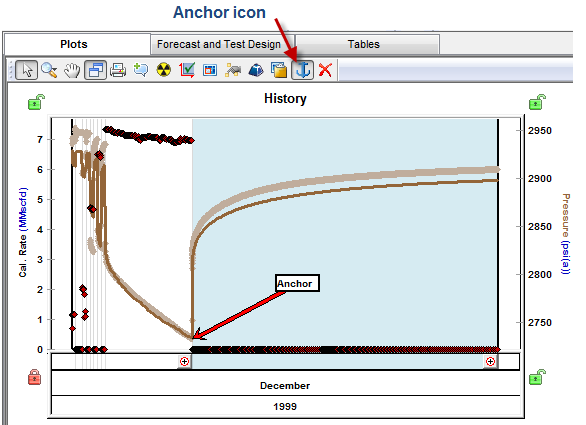
Clicking the Anchor icon automatically places an anchor arrow on the measured pressure preceding the first selected flow period. At the same time, the mouse pointer changes to an anchor, so that you can relocate the anchor from the default position by clicking any measured pressure on the history plot. The anchor point is annotated with an arrow, and if you change the position of the anchor arrow, the model will automatically recalculate.
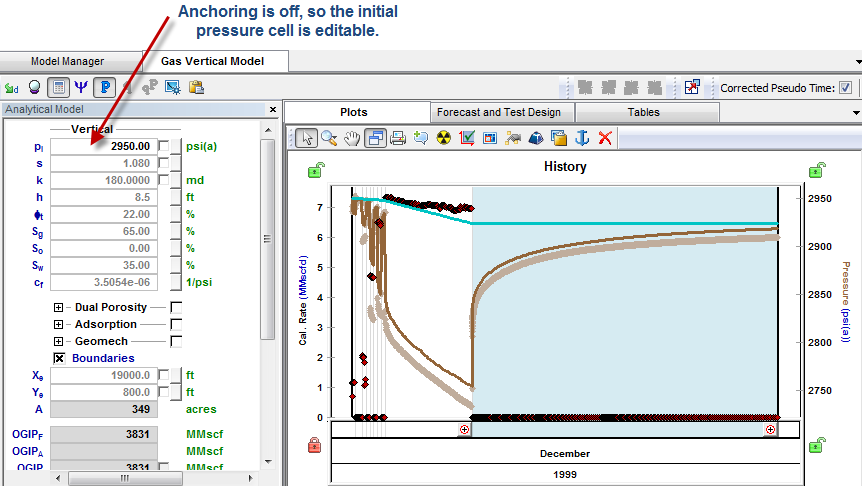
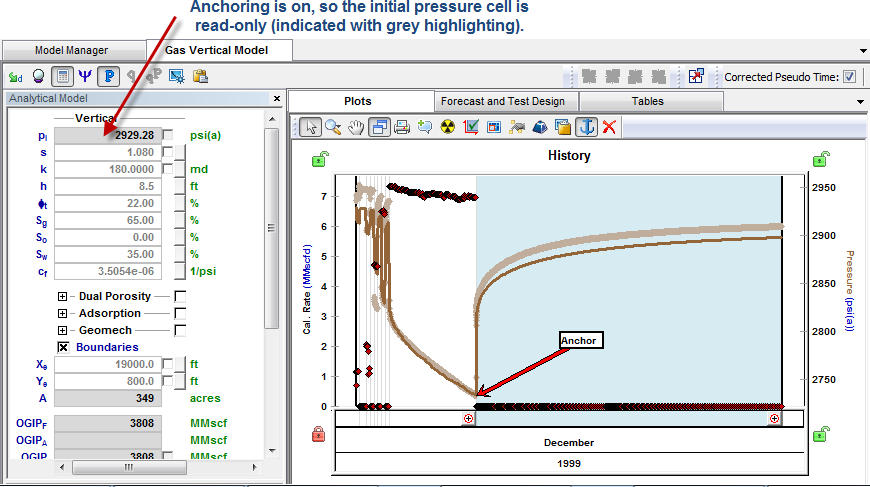
The advanced suite of models has an initial pressure input cell. When anchoring is on, the initial pressure is back-calculated and the cell is read-only. When anchoring is off, the initial pressure cell is editable.
| Note: | The anchor option is currently only available for analytical models in Calculate Pressure mode. |
 Click to show / hide example screenshots