 To change curve mnemonics
AccuX uses an alias table to specify which logs to download from the IHS Energy Information Hub, to create log response queries, and to calculate petrophysical properties. You can add any mnemonics and remove some mnemonics that appear in the alias table. If sharing AccuX amongst multiple users, changes made to the alias table affect all users.
Click Default Mnemonics for a list of commonly used mnemonics that you can copy (CTRL+C) and paste (CTRL+V) in the dialog box below.
To change curve mnemonics
1. From the Edit menu, select Digital Curve Mnemo/Alias.
The Digital Logs: Alias
dialog box appears.
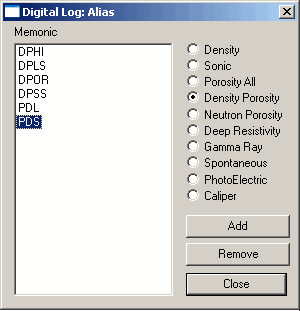
2. Select the radio button of the log type for which to add or remove mnemonics.
The Mnemonic area displays the mnemonics associated with that log.
3. Either click Add to display the Digital Curve Mnemo dialog box and type the mnemonic to add, or select a mnemonic in the display area and then click Remove.

