Procedural
topics that guide you through an entire process, such as importing
.las files. Procedural topics contain links to dialog box field descriptions
and other related procedural topics.
Procedural
topics that guide you through an entire process, such as importing
.las files. Procedural topics contain links to dialog box field descriptions
and other related procedural topics.Click Help in the main toolbar or press F1 on the keyboard to launch the help system.
The help system contains two types of topics:
Procedural
topics that guide you through an entire process, such as importing
.las files. Procedural topics contain links to dialog box field descriptions
and other related procedural topics.
Dialog
box field descriptions that define each field in a dialog box.
Dialog box field descriptions contain links to the procedural topics mentioned
above.
To print dialog box field description topics, right-click the topic and
select Print from the shortcut
menu.
There are multiple ways to navigate both in the main
interface and within procedural and popup topics as depicted below:

 To navigate the help system
|
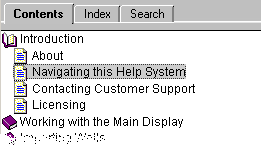
Click the Contents
tab to display a hierarchical book view, then click books to display the
topics within. |
|
|
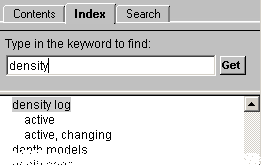
Click the Index tab and either browse to the desired topic or type it and click Get. |
|
|
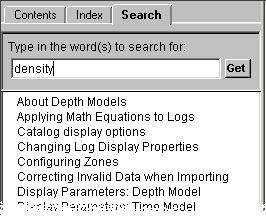
Click the Search tab, type the desired term in the top box, click Get, then double-click a specific topic in the list. |
|