 ) > Directional properties.
Import a directional survey saved in GeoGraphix, Open Works, or ASCII format. When the directional survey is applied to the synthetic, you can display it showing deviation calculated from a projection of the wellbore onto a user-selected azimuth.
You can only modify directional properties after you import a directional survey. For details, see Related Topics below.
To change deviated well properties
1. From the Edit menu, select Well and Log Properties () > Directional properties.
The Well Properties: Directional properties
dialog box appears.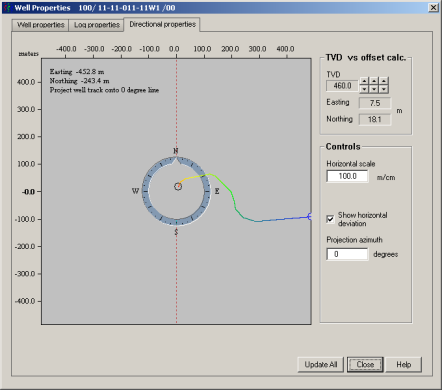
2. Hover the cursor
( ) over the display pane and move it along the deviation
line to view the Eastings and Northings.
) over the display pane and move it along the deviation
line to view the Eastings and Northings.
3. Do either of the following:
Hover the cursor over the compass.
The cursor becomes a hand ( ). Click and hold while dragging
the dashed red projection line (oriented north-south by default), and
release the mouse button to place the line.
). Click and hold while dragging
the dashed red projection line (oriented north-south by default), and
release the mouse button to place the line.
Type a value in the Projection azimuth box.
4. Click Update to see the effects of your changes on the main synthetic display then click Close.
| Importing Directional Surveys | Changing Well Display Properties |