 )
)OR
Right-click the well header and select Synthetic properties.
Configure general options in the main synthetic display including what elements to display, vertical scale properties, the zone of interest, and the number of undo levels.
Once the synthetic is configured as desired, you can save the current display options in an import default file that applies to all new synthetics. For details, see Related Topics below.
To change the main synthetic display
1. From the Edit menu, select Synthetic properties ()
OR
Right-click the well header and select Synthetic properties.
The Synthetic Properties
dialog box appears.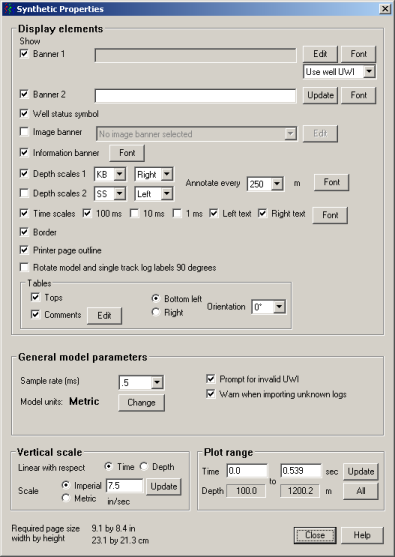
In the Display elements pane, select what informational elements appear in the main synthetic display. To import a company logo, beside the Image banner box, click Edit.
In the General model parameters pane, specify sample rates, up to 10 undo limits, and whether the import process prompts you when either missing or invalid UWIs or aliases are found in the import file.
In the Vertical scale pane, select either the time or depth and in the Plot range pane, type the top and bottom of the zone of interest to display.
2. Click Close to apply the changes to the main synthetic display. These changes only apply to the current synthetic.
| About the Main Synthetic Display | Changing Import Defaults |