 ).
).OR
Double-click the log
OR
Right-click the log and select Log editing.
In Amplitude vs. Offset modelling, as seismic waves reflect off an interface, the amplitude of the reflected wave is affected by the amount and type of fluid that occupies the pore space of the rock.
GeoSyn applies Gassman's equation to model this using a P sonic, shear sonic, and density log. You change the water saturation to apply different scenarios to your model. The available pore space not saturated with water is assumed to contain oil and gas.
Click for in-depth details on how fluid replacement modelling is implemented in GeoSyn.
To model fluid replacement
1. From the Edit menu, select Log editing ().
OR
Double-click the log
OR
Right-click the log and select Log editing.
The Log Editor
dialog box appears.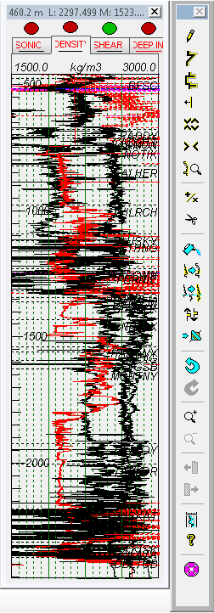
2. In the toolbar
beside the Log Editor,
click the Fluid Replacement Modelling
tool ( ).
).
The Fluid Replacement Wizard (Input and output logs, depth range)
dialog box appears.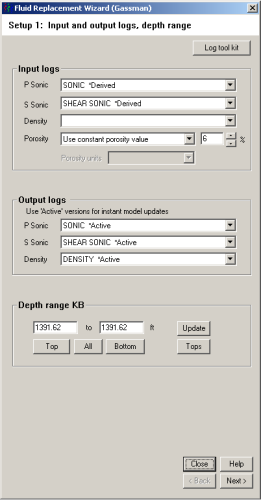
3. GeoSyn automatically populates the Input logs and Output logs drop-down lists if the required logs are available in your model; otherwise, click Log tool kit to display the Fluid Replacement Tool Kit dialog box and complete the three bullet steps below.
The Fluid Replacement Tool Kit
dialog box appears.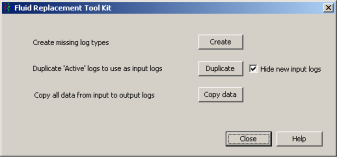
Click Create.
The AVO log suite
dialog box appears.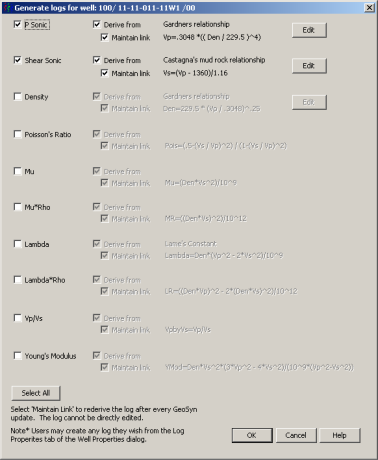
Click the log types to create in the left column and ensure Maintain link is cleared so that changes you make to the derived log aren't overwritten by the parent log, and then click OK.
Click Edit to the right of a log type to display the Edit the Derivation Equation for Log dialog box and modify the equation used to derive the log.
Using the Fluid Replacement Tool Kit dialog box, click Duplicate to copy the created logs to the Output logs pane of the Fluid Replacement Wizard (Input and output logs, depth range) dialog box.
If you want to undo fluid replacement changes made to the output logs, using the Fluid Replacement Tool Kit dialog box above, click Copy data to refresh the output logs with the original input logs data.
4. Click Next.
The Fluid Replacement Wizard (In-situ
reservoir properties)
dialog box appears.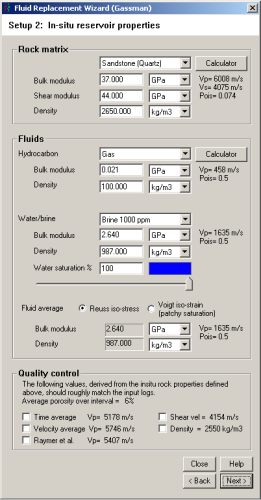
5. Select default Rock matrix, Hydrocarbon, and Water/brine types from the drop-down lists in the Rock matrix and Fluids panes. For Water saturation, instead of typing a percentage in the field, you can drag the slider below it to change the value and note the effect it has on the Bulk modulus and density values in the bottom portion of the dialog box.
For detailed calculations, click Calculator in the Rock matrix and Fluids panes to display either the Minerals Calculator or the Batzle and Wang Fluid Properties Calculator dialog boxes and select values more specific to your zone of interest.
6. Click Next.
The Fluid Replacement Wizard (Calibrate
shear log for water saturations < 100%)
dialog box appears if the water saturation defined using the previous
dialog box is less than 100%.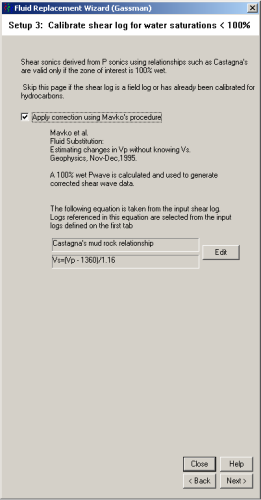
The above dialog box is used to compensate for the fact that the shear
log is frequently derived from a sonic log using Castagna's formula. Castagna's
formula requires a correction when gas is present in the zone of interest.
Select the check box and click Next.
The Fluid Replacement Wizard (FRM
Modelling: Set new water saturation)
dialog box appears.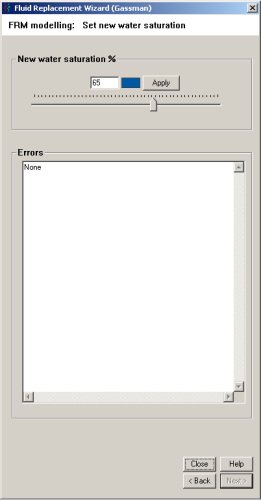
7. Ensure the above dialog box doesn't overlap the Log Editor displaying the well for which you're modifying water saturation, and then drag the slider while viewing the affect in the Log Editor dialog box and in the model.
8. Click Apply to save these changes to the log.
| Changing Log Display Properties | Notes on GeoSyn Fluid Replacement |