Before printing, it's a good idea to set up the page the way you want it. You can specify a unique page size, margins, and printing scale that automatically applies to both the index and detail views. The Suggested Paper Size option i n the main ribbon displays the optimum paper size for your print job based on the scale size selected in the Page Setup dialog box. The suggested optimum size changes as you select different print scales (1:240, 1:480, etc.).
Options defined in the Page Setup dialog box only apply to printed copies, not to the application view.
To select page setup options
- Click Page Setup(
 ) from the Setup group in the Print tab of the main ribbon,
OR
Click File ( ) > Preferences, and then the Page Setup tab.


Depending on your selection above, one of the following appears:
The Page Setup
dialog box. 
The Preferences: Page Setup
dialog box.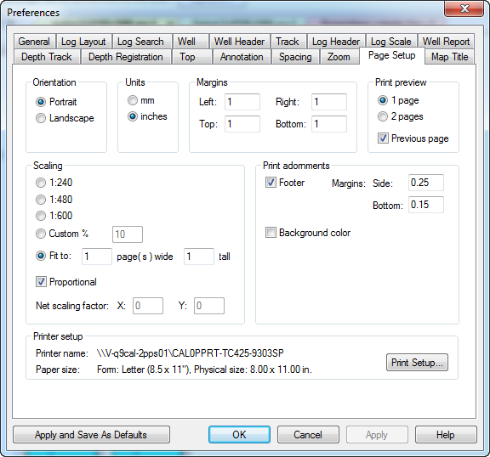
- Select the desired options then click OK.