Coordinate reference systems link a coordinate system with a datum to show the relationship of the coordinate system to the surface and shape of the Earth.
Map projections plot features from a three-dimensional sphere onto a two-dimensional map. Map projections rely on a fixed reference point called a datum to perform their calculations. There are numerous projections for different geographic areas and at different map scales, each with their own unique datum. For example, at larger map scales, EDIN displays maps using the plate carree projection and the WGS84 datum.
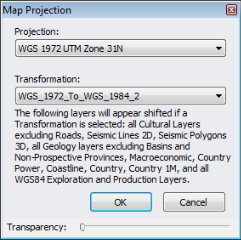
The map projection automatically changes to one of several defaults as your map center point and scale changes, but you can override these defaults by selecting a different map projection and a different transformation algorithm if data appears shifted. Selections affect both map display and map exports when your map scale is within the range to which the selected projection pertains.
To change a map projection
1. From the Map menu, click Projection.
The Map Projection dialog box appears.
2. From the drop-down list, select the desired map projection.
If available, select a transformation with which to align the coordinates to the above projection. Only transformations relevant to the chosen projection appear.
You can also select No Transformation.
Drag the slider to the right to reduce the opacity of the dialog box so that objects below the dialog box become visible.
Layers with mixed datums aren't transformed.
The map projection and transformation applied appears in the status bar below the map.
The map is saved with the projection defined above. If [Default] is selected, the map opens with one of several projections depending on the map scale. Click Map projection vs. scale cutoffs for details.
Transformations are only applied to layers to which the GCS_WGS_1984 datum has been applied. GCS_WGS_1984 is only applied to layers where the majority of items on that layer are qualified and transformed to WGS84 from their original datum.
Transformations from which you can select are only those for which a valid transformation exists for both WGS84 and the desired map projection datum.
Datum transformations are saved and exported along with the map.
| Zooming maps | Changing default units |