 appear along all four sides inside of the Map window and also in the center of the Map window as depicted below.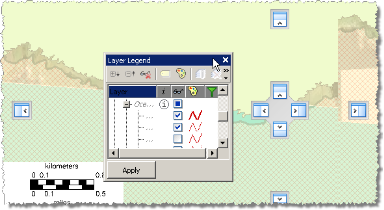
Move the Layer Legend as a floating toolbar outside of the Map window or dock it on the left, right, top, or bottom of the Map window. EDIN remembers your Layer Legend preferences between sessions.
To position the Layer Legend
1. Click the Layer Legend title bar as depicted below and drag the Layer Legend over the Map window.
Placement controls appear along all four sides inside of the Map window and also in the center of the Map window as depicted below.
2. Drag the Layer Legend over a placement control to dock the Layer Legend in the implied area of the Map window.
The quadrant of the Map window in which the Layer Legend will be docked is highlighted in the Map window.
3. Release the mouse button to place the Layer Legend.
To position the Layer Legend outside of the Map window, drag the Layer Legend outside of the Map window.
| Opening maps | Customizing the interface |
| Docking the Data Navigator pane |