 Click to see subtopics:
In order to analyze well data in Harmony, you need to select an entity (for example, a well or group), and then click the Analysis tab.
To select an entity for analysis, follow the steps in the table below.
| Location | Method of Selecting | Notes |
|---|---|---|
| Entity Viewer (Hierarchy or Custom) |
|
You can select any entity that exists in the viewer. |
| GIS map |
|
You can only select a well from the GIS map. |
| Analysis tab |
|
You can select any entity that exists in the viewer. |
After you have selected an entity for analysis, that entity is locked until you select another entity. In other words, the lock is released when you click another entity. If another user tries to open the same entity for analysis while the lock is in place, a message is displayed in the main pane and the Status Window. There is no way to force the release of the well, but the username with the locked well is displayed in the Status Window.
Note: The editors are also locked when you are performing an analysis.
To analyze an entity:
1. Select an entity for analysis.
The New Worksheet tab opens. Or, if there is an analysis already in place, the existing analysis opens.
2. Add a worksheet. (You must add a worksheet before you can analyze an entity.) Click a worksheet image, and if applicable, select a worksheet type from the submenu.
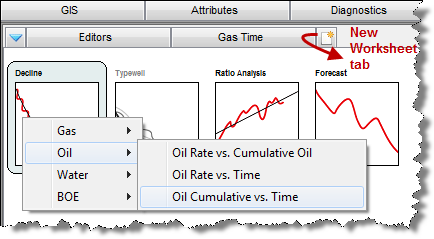
The worksheet is added.
3. Add an analysis by clicking the + icon on the Analysis Manager toolbar and selecting an analysis type. A decline analysis is shown as an example.
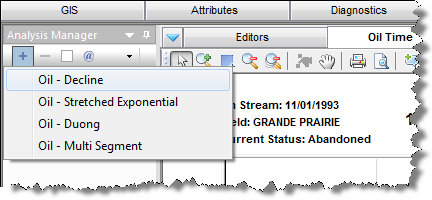
The analysis is added to your worksheet. For more information on analyses, see analysis types.
To analyze a condensate decline analysis:
1. Select an entity for analysis.
The New Worksheet tab opens. Or, if there is an analysis already an analysis in place, the existing analysis opens.
2. Add a gas worksheet.
Note: For more information, see the procedure above.
3. Click the Plot Selection tab and do the following:
 ).
).
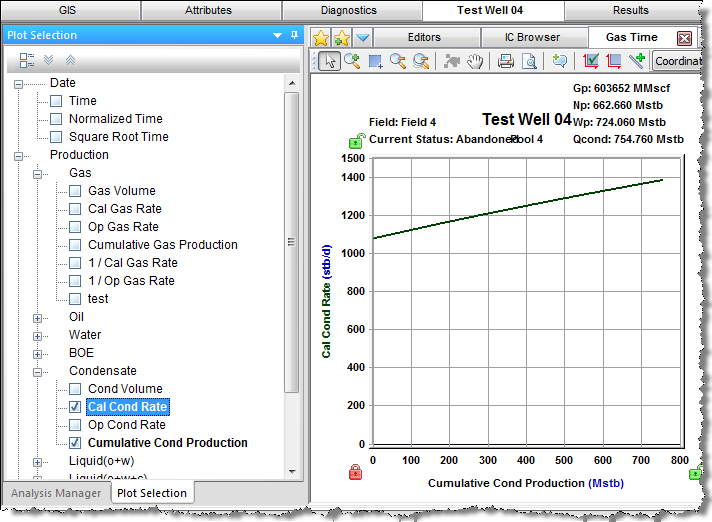
4. Click the Analysis Manager tab; click the + icon and select a condensate analysis.
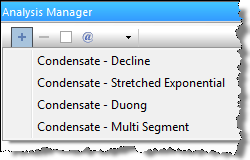
The analysis is added to your worksheet.
IHS Harmony™ 2016b Multi-User | Last revised: October 19, 2016
Copyright © 2016 IHS Inc.