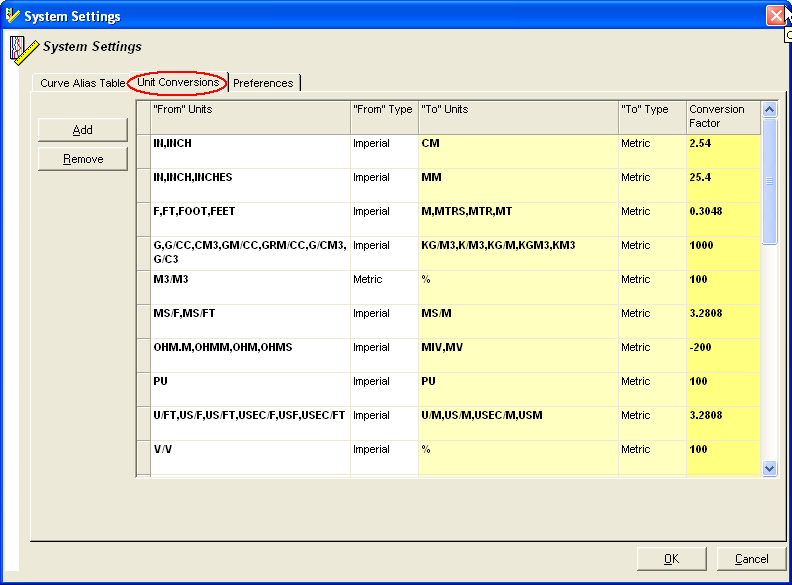
Unit Conversions Table
The Unit Conversions table contains the conversion factors that convert the curve data from one unit into another unit, e.g. convert inches to mm, or convert % to v/v.
Visual Log uses this function to adjust the curve display when the actual units of a curve are different from the requested display units. The world-wide use of two common measurement systems, U.S./Imperial and Metric, necessitates the ability of Visual Log to convert between units in the curve display as required.
In addition, while most curve groups have a single default unit of measure (i.e. Resistivity – DEEP is displayed in OHM.M), others have several common units of display even within the same measurement system (i.e. DENSITY POROSITY is commonly displayed in either v/v(decimals) or %(integers)). In the Curve Alias Table, you set the default units in which the curves in a track are displayed.
Add – add a new conversion record to the list with ‘NEW’ in the Units columns and ‘1’ as the Conversion Factor. Double-click ‘NEW’ in the “From Units”, “To” Units and Conversion Factor to edit those fields. In the “From” Type field, select either Imperial or Metric. Multiple variations of an abbreviation (for the same unit) can be listed in the record, i.e. F, FT, FOOT, FEET.
Remove – delete the selected conversion record. A message appears asking you to confirm the deletion.
Auto-Insert of Conversion Factors – occasionally, a new curve loaded into Visual Log has a unit type that is not recognized in the Units Conversion table. When this occurs, Visual Log automatically inserts a record in the Units Conversion table, display the table, and prompts you to enter the appropriate factor.
The inserted record has a default conversion factor of 1. Double-click the number and then enter the appropriate conversion factor.
 Related Topics

IHS Markit™