 To change well elevation using
the map view
To change well elevation using
the map viewYou can change the KB elevation and other options that affect the accuracy of your subsurface maps using the map view.
To change well elevation using
the map view
1. Right-click the well with an anomalous value and from the shortcut menu, select General Info Dlg.
The General Well Information
dialog box appears.
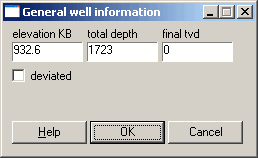
2. Type the desired elevation KB, total depth, or final tvd then click OK.

|
|
