 To display drainage circles
You can display different bubbles to represent the drainage radius for oil, gas, water, and unknown substances. When zoomed out, all bubbles appear the same size, but as you zoom in, gas bubbles cover 640 acres, while bubbles for oil, water, and other substances cover 80 acres.
To display drainage circles
1. In the left toolbar,
click Double Bubble ( ).
).
The Producing Wells Postings
dialog box appears.
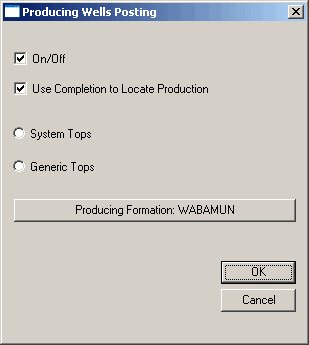
2. Ensure the On/Off checkbox is selected, then click Producing Formation to display the Formation Lookup dialog box and select the formation for which to display drainage information.
3. Select Use Completion to Locate Production if you want to post values from actual production data if it exists, and select whether to define the formation using AccuMap system tops or generic tops that exist in your AccuX Working folder.
4. Click OK.

|
|
