 To create global density porosity
curves
To create global density porosity
curvesYou can globally create density porosity curves from RHOB for an entire project using the unique matrix density. Generated DPSS, SPLS, or DPDL curves can be used to create traditional types of crossovers of Density Porosity and Neutron Porosity. If you are not going to generate crossovers you don’t need to generate new curves because AccuX can calculate effective porosity compensated for the presence of shale directly from RHOB. Using direct RHOB is preferable because you can set a unique matrix density for each target zone (sandstone, limestone, or dolomite).
To create global density porosity
curves
1. From the Global menu, select Global Digital Curve Manager.
The Global Digital Curve Manager
dialog box appears.

2. In the left list area, select RHOB and click create density porosity.
The Porosity Log Generation
dialog box appears.
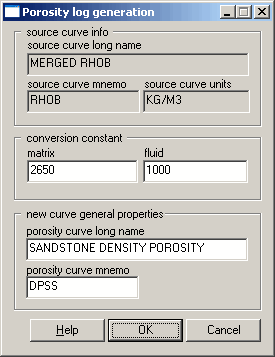
3. Accept the defaults
OR
Using the Average Characteristics of Rock Types
table, type the matrix and fluid parameters.
 Note: If your source curve units are G/CM3 or G/C3,
type 2.65 in the matrix
box and 1 in the fluid box (for DPSS).
Note: If your source curve units are G/CM3 or G/C3,
type 2.65 in the matrix
box and 1 in the fluid box (for DPSS).

|
|
