 To create local density porosity
curves
To create local density porosity
curvesYou can create a density porosity curve for a single well.
To create local density porosity
curves
1. In the cross section area, double-click the curve on which you want to base your density porosity curve (typically RHOB).
The Single Curve Managing
dialog box appears.

2. Click one of the following:
 Sandstone
DPSS
Sandstone
DPSS
Limestone
DPLS
Dolomite
DPDL
The Porosity Log Generation
dialog box appears.
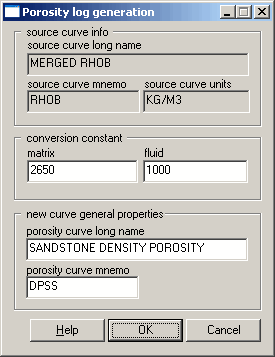
3. Accept the defaults
OR
Using the Average
Characteristics of Rock Types
table, type the matrix and fluid parameters.
4. Click OK.
 Note: If your source curve units are G/CM3
or G/C3, type 2.65 in the matrix
box and 1 in the fluid box (for DPSS).
Note: If your source curve units are G/CM3
or G/C3, type 2.65 in the matrix
box and 1 in the fluid box (for DPSS).

|
|