 ) > Log Properties.
Change the display properties of logs in the current synthetic including label information, which logs are the active sonic and density, and other details. The term Active denotes the log upon which the synthetic is based. If you have several sonic logs with different geological scenarios in one synthetic, for example, you can switch which of the sonic logs is the active one to see what affect it has on the model.
You can also create new logs or duplicate and modify existing logs. For example, you can apply a mathematical equation to a log to derive a log that's useful for AVO modelling and that would otherwise not be available. Changes you apply affect only the current synthetic, not log defaults for new synthetics. For details on changing log defaults and import defaults, see Related topics below.
) > Log Properties.The Well Properties: Log properties
dialog box opens.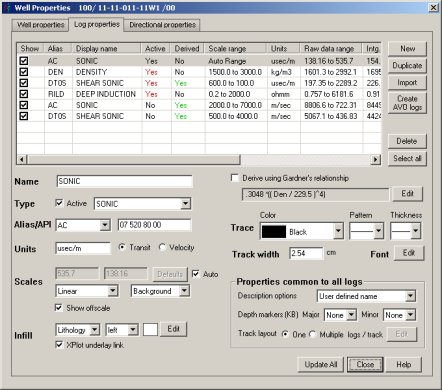
Duplicate and modify selected logs, and also clear logs in the Show column to save them with the synthetic but hide them from the main synthetic display.
If the synthetic layout is only a single log per track, specify track and infill colors. For details on editing color, see Related topics below.