 ) > Time Model
OR
Double-click the time page.
Change the dimensions and display properties of the time model and also the display properties of synthetic traces themselves.
Create multi-offset models for amplitude offset analysis. If summing traces, you can define groups of traces (near, middle, far) and then using mathematical operations between the three groups, filter or enhance certain portions of the offset trace. For example, you might subtract the far traces from the near traces and then multiply the difference by the far traces to enhance the far offset amplitude.
To change time models
1. From the Edit menu, select Display
Parameters () > Time Model
OR
Double-click the time page.
The Display Parameters: Time Model
dialog box appears.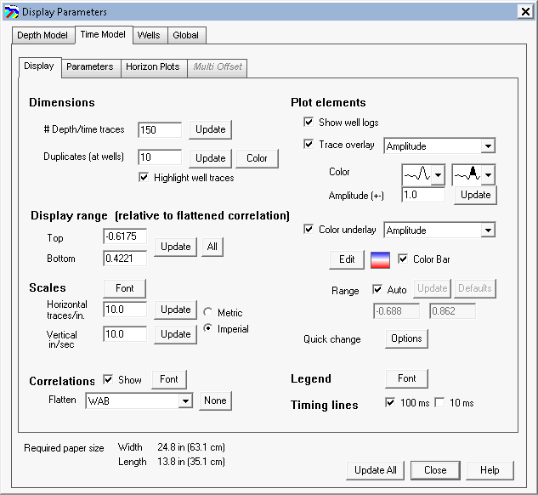
2. Select the configuration options to display in the model.
3. Click the Parameters tab.
The Display Parameters: Parameters
dialog box appears.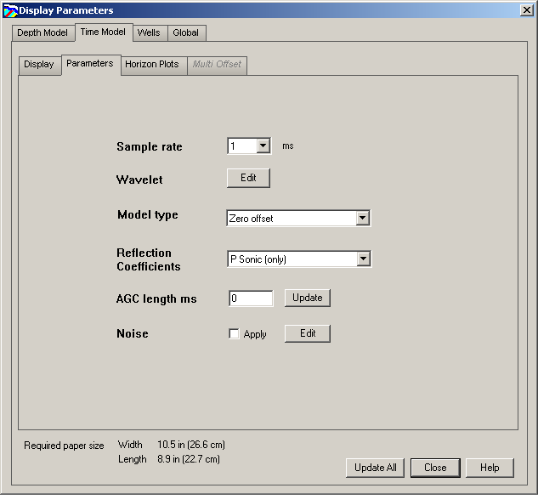
4. Select the processing options and if generating a multi offset model, click the Multi Offset tab.
If any of the curves required for multi-offset modelling are missing, GeoSyn prompts you to generate them.
The Display Parameters: Multi-Offset
dialog box appears.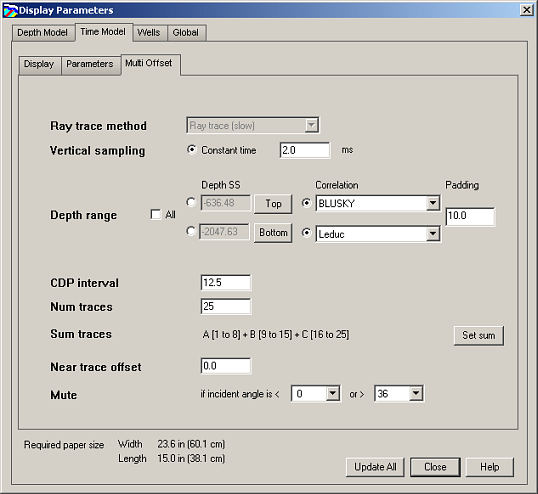
5. Select the multi-offset options and then click Update All.
| About Time Models | Changing Depth Models |