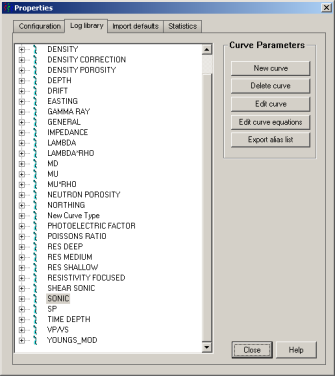
GeoSyn maintains a centralized database of log definitions for all log types. You can customize settings for track widths, scales, aliases, color fills, and more. These settings apply to new models where log settings aren't already defined in the import defaults file.
The import defaults file generally contains all default settings except those that apply to logs, but when you update the import defaults file with settings from the current model, settings for log types in the current model are also written to it. Log settings in the import defaults file override, but don't overwrite settings in the log definitions database.
When GeoSyn creates a model, it first checks whether display settings for the logs upon which the model will be based exist in the current import defaults file. If they do, GeoSyn uses them instead of the settings in the log database. For details on changing import defaults, see Related Topics below.
The log database is the LogInit50.gld file in the GeoSyn Working directory.
To change log defaults
1. From the Edit menu, select Configuration properties > Log Library.
The Properties: Log Definitions
dialog box appears.
2. In the tree display, click the plus sign (+) beside the appropriate node to expand it and view current configuration details.
3. Click Edit curve.
The Edit Default Display Properties
dialog box appears.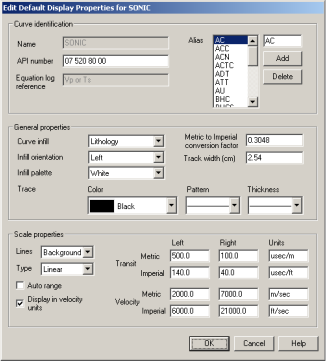
4. Configure the curve properties then click OK to return to the Properties: Log Definitions tab.
5. Click Close to return to the main display. The changes you made are applied to future models providing a different setting doesn't exist in the import defaults file for that model.
| Changing Import Defaults | Changing Log Display Properties |