Open topic with navigation
Inserting log sections
Create a section of log with a constant value and insert
it at a specific depth to provide a time datum shift or to provide room
for new geological section. You can also specify whether to raise or lower
the log start depth or stop depth to accommodate the insertion.
When you insert a section in any log, new data is inserted
in all logs throughout the model. You can specify different constant
values to insert in each of the individual logs.
To insert log sections:
- Open the log editor:
- Edit > Log editing
- Double click on a log in the model.
- Right-click on a log and select Log editing.
- Select the tab
for the log in which to insert a log section and in the Log Editor toolbar,
click the Insert Section tool
(
 ).
).
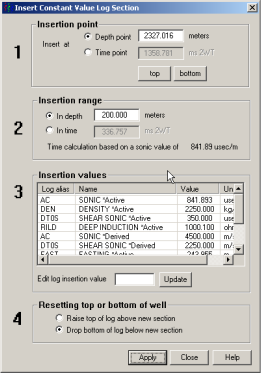
The
dialog box appears.
- Hover the cursor
(
 ) at the top of the zone at which to insert a log section.
The cursor position appears in the banner of the Log Editor.
) at the top of the zone at which to insert a log section.
The cursor position appears in the banner of the Log Editor.
- Drag to the bottom
of the zone.
- In the Insertion
point pane, type a more precise depth at which to insert the log section
or click top or bottom
to select the absolute top or bottom of the log.
- In the Insertion
range box, type the thickness to insert. This section is inserted in every
log throughout the synthetic.
- In the Insertion
values display pane, select a log to display the constant value that will
be inserted in the Edit log insertion value box and each of the logs.
Type a different constant value if desired.
- Select whether to raise the start depth or
lower the stop depth and click Apply.
Related Topics
Cutting logs
Shifting logs
Open topic with navigation