 To
change contour lines
To
change contour linesWhen a Z-value equals or exceeds the major or minor contour interval you define, a thick or thin contour line appears on the map. You can change the number of contour lines that appear on the map by changing the major and minor contour steps.
You can inspect contour lines by hovering the cursor over a line. A tooltip displays the contour type and Z-value.
To
change contour lines
1. In the
left toolbar, click Map Contour
( ).
).
The Map Contours
dialog box appears.
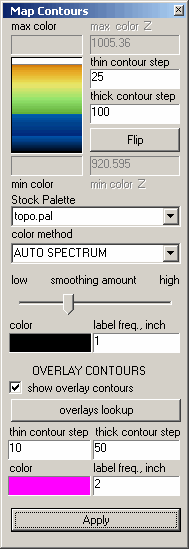
2. Type desired values in the thin and thick contour step boxes. You can also select the color in which to display min max values and type how many to display per inch.
 To
adjust the smoothing, drag the smoothing
amount slider.
To
adjust the smoothing, drag the smoothing
amount slider.
