Open topic with navigation
Creating Blocked Log Models
Block sections of existing logs using Log Editor so that
GeoSyn, working within the highlighted zone, applies the mean, median,
or RMS value between two tops to each set of tops.
To block portions of existing
logs using Log Editor:
- Open the log editor:
- Edit > Log editing
- Double click on a log in the model.
- Right-click on a log and select Log editing.
- In the log editor toolbar click the Blocking
tool (
 ).
).
The
dialog box opens.
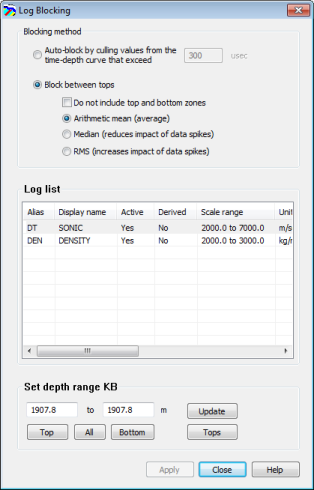
- Select the algorithm
used to derive a constant value that's applied to the zone between shallowest
and deepest tops within your selection. GeoSyn automatically connects
your selection to the nearest top.
- Select the log(s)
to block.
CTRL+CLICK or SHIFT+CLICK for multiple selection.
- Do one of the
following:
- Drag the cursor (
 ) on the Log Editor log display pane to select a range to
block.
) on the Log Editor log display pane to select a range to
block.
- Type values in the Depth range
KB pane for the start and stop depth and click Update.
- Click either top
or bottom to accept the absolute
depth from the log or click All
to accept both.
- Click Depths
from tops to display the Depth
Range from Tops dialog box and then select the formation tops that
signify your zone of interest from the drop-down lists and click OK.
- Click Apply.
Related Topics
Drawing Straight Edge and Freehand Curves
Clipping or filtering logs
Cutting logs
Inserting log sections
Applying math equations to logs
Shifting logs
Open topic with navigation